Auto-wait: what an action waits for, and what it refuses
A tap in Mobium is not a touch at some coordinates. Before it touches anything, an action finds its target on a fresh read of the screen and checks that a finger could really press it. It waits for the checks that time can fix, and refuses the ones it can't — with a reason, never with a touch somewhere else reported as success.
This guide goes through each check on MobiumApp, Mobium's own app under test, whose screens were built to fail each one. Every command and every line of output below is what an Android 15 emulator printed on 2026-09-28; the iOS simulator behaves the same, and where it differs, it says.
Before this guide: the quick start, and MobiumApp
installed (mobiumdev/mobium-app).
The checks
Five checks, each with a name that a refusal carries:
| Check | What it asks | If it fails |
|---|---|---|
visible | is the target on the screen, not just in the hierarchy? | scrolls to it, then refuses |
stable | has it stopped moving? | waits, up to 5 seconds |
enabled | does it take input? | waits, up to the implicit wait of 2 seconds, then refuses |
receivesEvents | would a finger reach it — no dialog, keyboard or other control over it? | waits for a transient cover (a toast), aims around one over its center, refuses one over all of it |
editable | for type and fill: is it a text field? | refuses at once |
A refusal always reads <target> failed check <check>: <reason> — <what to do>,
and carries the check in its details, so code decides by the check, not by the
wording (section 6).
1. Waiting for something to stop moving
The Motion Demo's Replay button slides a target in over two seconds. Tap the target the moment after Replay, with no sleep in between:
$ mobium tap testid=ignoringReplay
tapped testid=ignoringReplay at (540, 1315)

$ mobium tap testid=ignoringTarget
tapped testid=ignoringTarget at (316, 1472)

$ mobium text testid=ignoringResult
Ignoring: tapped 2697ms after replay
| Just after Replay: the target still sliding in | After the tap: it waited, and says when it arrived |
|---|---|
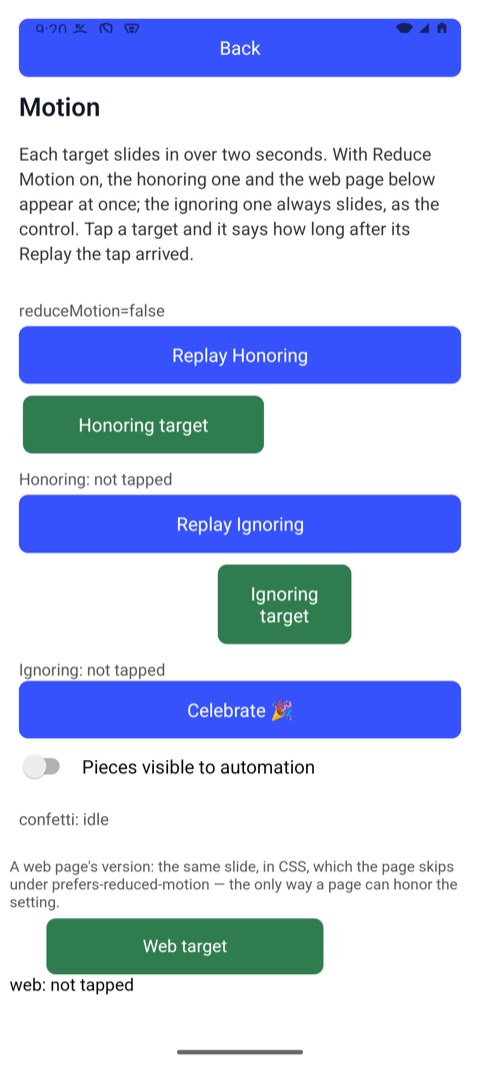 | 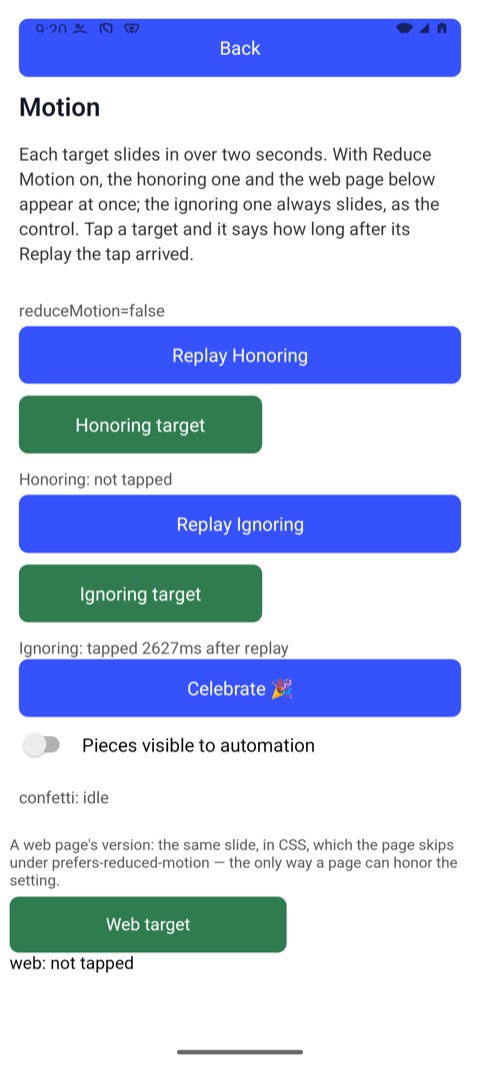 |
(These pictures are of a later run of the same two taps, which said 2627ms.)
The app's own stopwatch says the tap landed 2.7 seconds after Replay — after
the slide ended. The second tap waited for the target to hold still, and
touched it where it stopped, not where it was passing through. Something that
never holds still — a falling piece of confetti — is refused after five
seconds as failed check stable.
2. Waiting for a control to be enabled
The Login Demo disables Log In while it signs in. Tap it, and tap it again at once:
$ mobium fill testid=username mobium
typed "mobium" into testid=username

$ mobium fill testid=password wrongpass1
typed 10 characters into testid=password, a password field — not echoed

$ mobium tap testid=loginBtn
tapped testid=loginBtn at (540, 1457)

$ mobium wait testid=loginBtn --for disabled
testid=loginBtn is disabled after 619ms — @e5 Signing in… (button)

$ mobium tap testid=loginBtn
tapped testid=loginBtn at (540, 1689)
| After the first tap: Log In disabled, "Signing in…" | When it comes back: the app's answer, and Log In enabled |
|---|---|
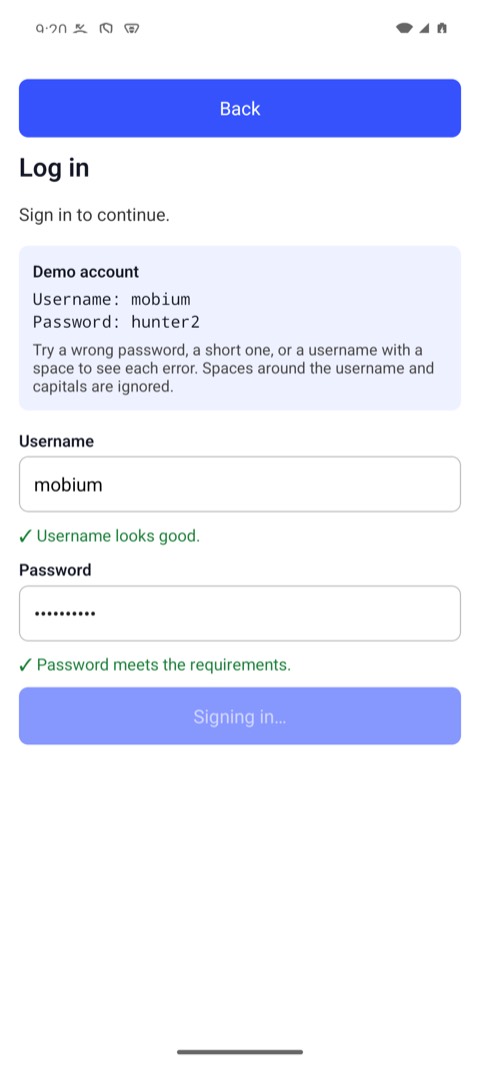 | 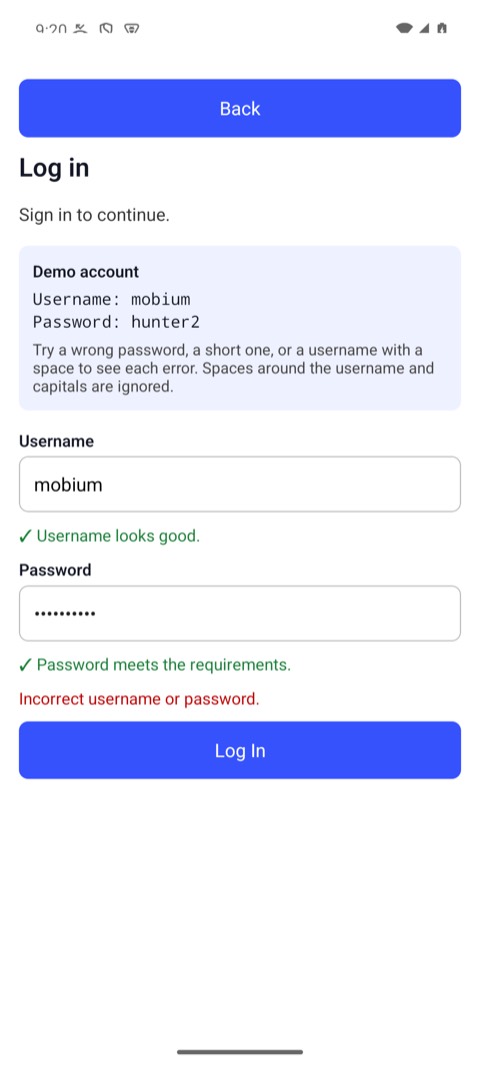 |
The second tap waited for "Signing in…" to end and the button to come back,
then pressed it. A tap on a disabled control does nothing, so reporting it as
done would be a lie; a control that stays disabled past the wait is refused as
failed check enabled. The password is never printed — only its length.
3. Refusing what is covered
The Obstruction Demo draws controls over its targets — a full cover, a half cover over the center, an edge cover that leaves the center clear, views that take no touches, an overlay hidden from accessibility, a scrim:
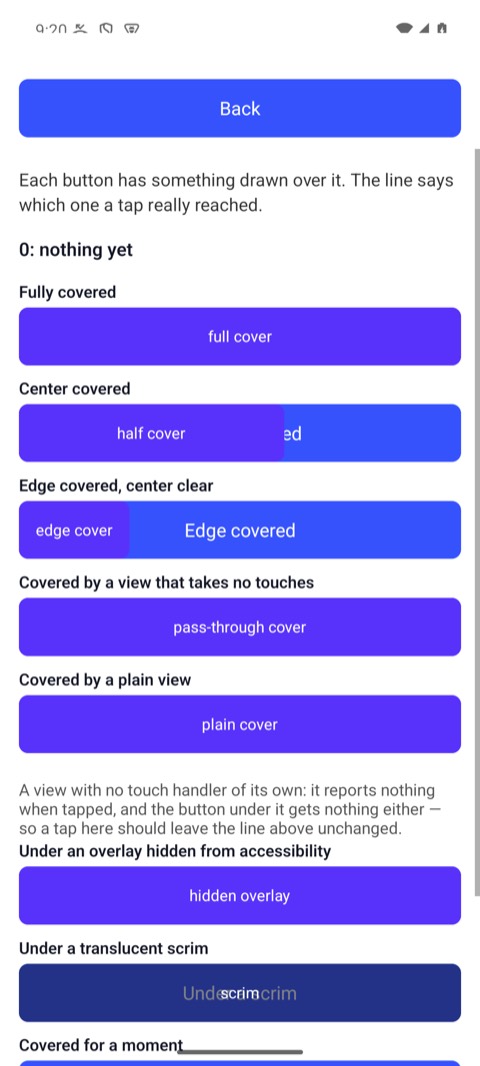
One is covered entirely by another button:
$ mobium tap testid=fullTarget
error: testid=fullTarget failed check receivesEvents: it is covered by "full cover" (button), and was for 2s — a touch there would press that instead; wait for it to go, dismiss it, or tap its own ref from app_map if it is what you meant
It waited two seconds in case the cover went away — a toast does — and then refused, naming the cover, rather than pressing it. Another target is covered only over its center:
$ mobium tap testid=halfTarget
tapped testid=halfTarget at (650, 975); its center is covered by "half cover", so it was touched at a clear point
It aimed around the cover and said so. A system dialog, an iOS sheet and the on-screen keyboard are covers too, refused the same way, with the remedy for each: answer the dialog, hide the keyboard.
4. Refusing the wrong kind of target
type and fill go into text fields. Anything that is certainly not one is
refused before a key is sent:
$ mobium type testid=loginBtn hello
error: testid=loginBtn failed check editable: it is a button, not a text field — app_type types into a field; to press it, use app_tap
5. Waiting on purpose: mobium wait
The checks above make each action wait for its own target. For everything else — a result to arrive, a spinner to go, a state to change — say what you are waiting for, instead of sleeping:
$ mobium wait testid=loginError --for text --text "Incorrect username or password." --exact
testid=loginError says exactly "Incorrect username or password." after 1.631s — @e1 ScrollView (list)
It returned as soon as the text was there — 1.6 seconds here, whatever it is on a slower device. What it hands back is the element you can act on: the error text is not a control, so the nearest thing on screen with a ref is named — here the list it sits in.
On the Form Demo, a wait that cannot hold says what it saw:
$ mobium wait testid=termsCheck --for checked --timeout 2s
error: timed out after 2.017s waiting for testid=termsCheck to become checked — it is unchecked

$ mobium check testid=termsCheck
testid=termsCheck is now checked
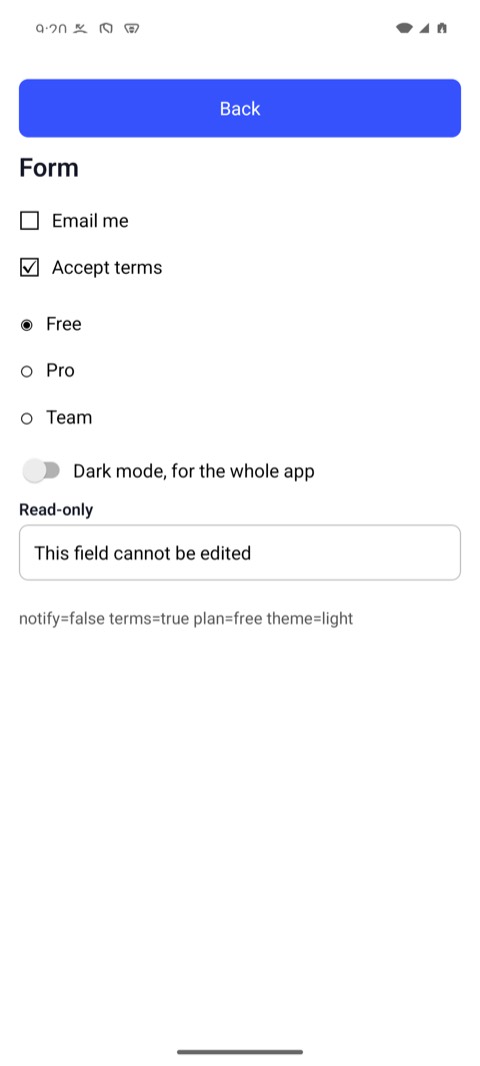
$ mobium wait testid=termsCheck --for checked
testid=termsCheck is checked after 12ms — @e3 Accept terms (checkbox, checked)

$ mobium wait role=radio --count 3
role=radio matches 3 on screen after 11ms

$ mobium wait testid=planFree --for checked --not --timeout 2s
error: timed out after 2.016s waiting for testid=planFree to stop being checked — it is checked
Every condition:
--for | Waits until |
|---|---|
visible (the default), hidden | it is on screen, or gone |
enabled, disabled | it takes input, or does not |
checked, unchecked | a checkbox, radio or switch is in that state; anything else is refused at once |
focused | a field has keyboard focus |
text --text T | its text contains T; with --exact, is T |
value --text T | a field holds exactly T; --text "" is empty. A password field is refused — its value is never read |
count (or just --count N) | the locator matches N elements on screen |
any of them --not | the opposite |
The default timeout is 10 seconds, --timeout changes it, up to two minutes.
A successful wait remaps the screen, so the element it found already has a
ref: mobium tap @e3 straight after, with no map in between.
6. Reading a refusal from code
--json gives the structured half of every answer. The same covered tap:
$ mobium --json tap testid=fullTarget
{
  "error": "testid=fullTarget failed check receivesEvents: it is covered by \"full cover\" (button), and was for 2.2s — a touch there would press that instead; wait for it to go, dismiss it, or tap its own ref from app_map if it is what you meant",
  "code": "element_not_reachable",
  "message": "testid=fullTarget failed check receivesEvents: it is covered by \"full cover\" (button), and was for 2.2s — a touch there would press that instead; wait for it to go, dismiss it, or tap its own ref from app_map if it is what you meant",
  "remedy": "dismiss what is over it, wait for it to go, or tap the cover's own ref from app_map",
  "retryable": false,
  "details": {
    "check": "receivesEvents",
    "cover": "full cover",
    "locator": "testid=fullTarget",
    "reason": "it is covered by \"full cover\" (button), and was for 2.2s"
  }
}
Decide by code — the same in every client, and the CLI's exit status (4
here) — and by details.check, never by the message, which is written for a
person and may change. Every client raises the code as its own exception:
ElementNotReachableError in Python and JavaScript,
ElementNotReachableException in Java and .NET, and in Go an error that
errors.Is(err, mobium.ErrElementNotReachable)
(the codes).
What it does not see
- An overlay hidden from accessibility on iOS, unless asked for.
WebDriverAgent's tree does not contain it, so a tap under one lands on it —
WebDriverAgent's own
hittablegets it wrong too, measured. UIKit's own hit test does see it:mobium hit-test <target>asks it whether a touch at the point a tap would use reaches the target, and names what it would reach instead. It attaches a debugger to the app, about two seconds a call on a simulator and nine on an iPhone, where the app must be a development build. On a simulator,mobium launch --hit-test <app>loads the check into the app as it starts, and then every action on an element in it asks first, in under a millisecond, and is refused when the touch would land elsewhere. - Whether a plain view swallows a tap. A view with no handler over the target looks exactly like one that lets touches through. Mobium taps and says a view is over the point, in the result, rather than refuse something that works.
- Work the screen does not show. A request in flight behind rows that
look finished passes every check, and a tap lands on a row about to be
replaced. An app that says when it is busy can be waited for:
gray box,
mobium launch --gray-box. - What the app does with the tap. A tap that reached its target is
reported as tapped. Whether the app did the right thing is what
wait, and a test, are for.