Quick start: mobium test
From an empty directory to a test suite that runs on a device, fails with evidence, retries, and leaves a report CI can publish.
Every command and every line of output below is what mobium test printed on
2026-09-28 — section 8 on 2026-09-29 — against
MobiumApp on an Android 15
emulator. Where a path to a report is shortened, it says so.
Before this guide: the quick start — mobium
installed and a device running — and MobiumApp installed
(mobiumdev/mobium-app). Nothing else: the runner is in the mobium binary.
1. A config and a test file
login-tests/
  mobium.config.json
  tests/
    login.test.json
mobium.config.json says where the tests are and which devices they run on.
A project is a device to run on:
{
  "testDir": "tests",
  "projects": [
    {"name": "android", "device": "emulator-5554"}
  ]
}
tests/login.test.json is two tests of MobiumApp's Login Demo. Each step is
exactly what app_batch takes — a tool and its arguments — and
each assertion is an app_wait_for step or an expect:
{
  "app": "dev.mobium.mobiumapp",
  "beforeEach": [
    {"name": "app_tap", "arguments": {"target": "label=Login Demo"}}
  ],
  "tests": [
    {
      "name": "a wrong password is refused",
      "steps": [
        {"name": "app_fill", "arguments": {"target": "testid=username", "text": "mobium"}},
        {"name": "app_fill", "arguments": {"target": "testid=password", "text": "wrongpass1"}},
        {"name": "app_tap", "arguments": {"target": "testid=loginBtn"}},
        {"name": "app_wait_for", "arguments": {"target": "testid=loginError", "condition": "text",
          "text": "Incorrect username or password.", "exact": true}}
      ]
    },
    {
      "name": "the demo account signs in",
      "steps": [
        {"name": "app_fill", "arguments": {"target": "testid=username", "text": "mobium"}},
        {"name": "app_fill", "arguments": {"target": "testid=password", "text": "hunter2"}},
        {"name": "app_tap", "arguments": {"target": "testid=loginBtn"}},
        {"name": "app_wait_for", "arguments": {"target": "testid=welcomeText"}},
        {"expect": {"tool": "app_state", "arguments": {"app": "dev.mobium.mobiumapp"},
          "field": "state", "equals": "foreground"}}
      ]
    }
  ]
}
Every test starts from a fresh app: app is stopped and launched — with
"grayBox": true beside it, launched with the gray box on —
then
beforeEach runs, then the test's steps. The file is checked before anything
runs — a misspelled tool, an argument its tool does not take, a key the
format does not have — and --list shows what a run would cover without a
device:
$ mobium test --list
  login.test.json › a wrong password is refused
  login.test.json › the demo account signs in
2 tests in 1 file
2. Run it
From the directory with the config:
$ mobium test
  ok    [android] login.test.json › a wrong password is refused (7.7s)
  ok    [android] login.test.json › the demo account signs in (7.8s)
2 passed (15.5s)
Exit status 0. Nothing in the test sleeps: every action waits for its own target (auto-wait), and every assertion retries until it holds or its timeout — ten seconds unless the step says otherwise.
3. A failure, and what it leaves
Change the first test to expect a message the app never shows — "text": "Wrong password.", with "timeout_ms": 3000 — and run just that test, with
all three reports:
$ mobium test -g "wrong password" --reporter list,junit,html
  FAIL  [android] login.test.json › a wrong password is refused (9.5s)
        step 4 (app_wait_for): [timeout] step 4 of 4 (app_wait_for) failed: timed out after 3.012s waiting for testid=loginError to say exactly "Wrong password." — its text is "Incorrect username or password."; steps 1-3 ran before it, and nothing after
0 passed, 1 failed (9.5s)
junit report: …/login-tests/mobium-report/junit.xml
html report: …/login-tests/mobium-report/index.html
error: 1 of 1 tests failed
(The report paths are shortened here.) Exit status 1. The failure names the
step, its error code, and what the screen said instead of what was expected.
mobium show-report opens the HTML report, which keeps, for each failure, a
screenshot and the screen's map at the moment it failed:
mobium-report/
  index.html
  junit.xml
  artifacts/
    android-login.test.json-a-wrong-password-is-refused-1.png
The report, with that failure open — the step and its message, the screen as it was when the wait gave up, with the app's real message on it, and the map:
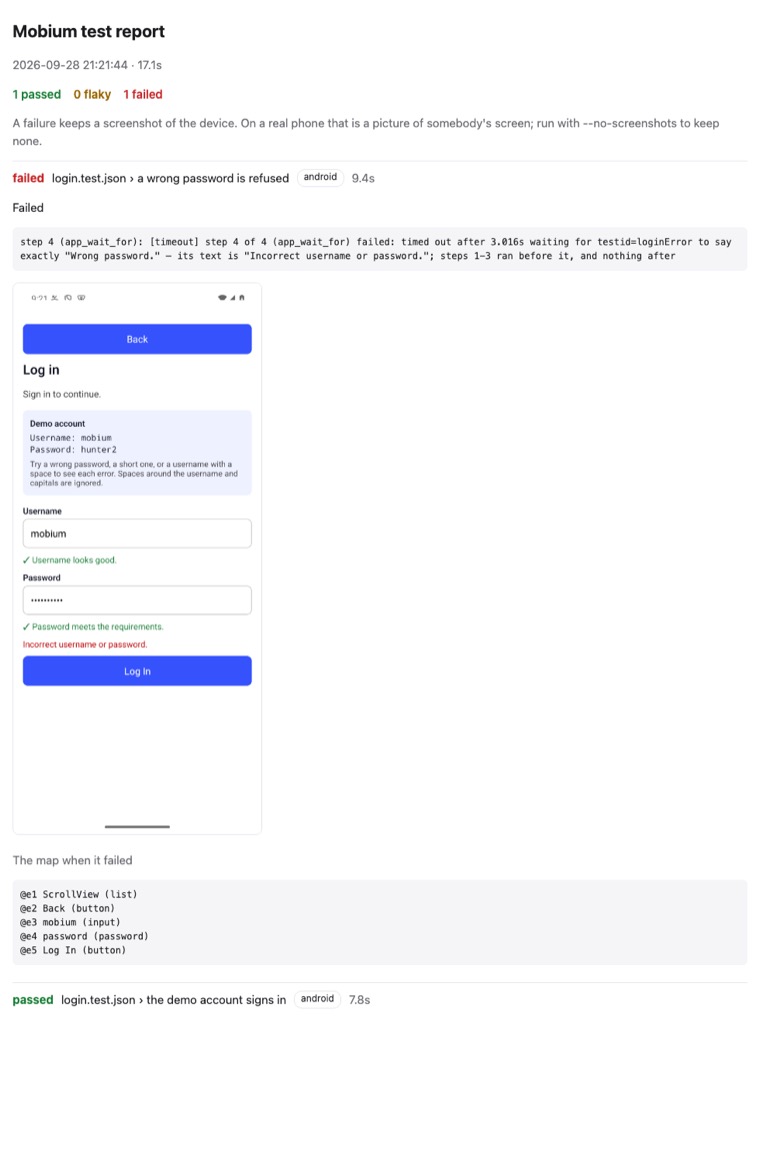
(This picture is of a run of both tests, the other one passing.) On a real
phone that screenshot is a picture of somebody's screen, and the report says
so; --no-screenshots keeps none. A report names a real phone by its model,
[iphone · iPhone 15 Plus], and never by its id.
4. Run only what failed
$ mobium test --last-failed
  FAIL  [android] login.test.json › a wrong password is refused (8.7s)
        step 4 (app_wait_for): [timeout] step 4 of 4 (app_wait_for) failed: timed out after 3.018s waiting for testid=loginError to say exactly "Wrong password." — its text is "Incorrect username or password."; steps 1-3 ran before it, and nothing after
0 passed, 1 failed (8.7s)
error: 1 of 1 tests failed
The previous run's failures are kept in mobium-report/.last-run.json.
5. Retries, and flaky
--retries N runs a failed test again, from a fresh app, up to N times. A
test that fails and then passes is flaky: the run passes, and it says so.
This is the runner's own control for it, from tests/controls/ in this
repository — it saves a counter, and passes only once the counter reaches 2,
which the retry's relaunch makes it do. It counts from cleared app data, so
clear it first — a counter left at 2 by an earlier run fails every attempt:
$ mobium clear-data dev.mobium.mobiumapp
$ mobium test tests/controls/flaky.test.json --retries 1
  flaky [android] flaky.test.json › passes on its second attempt (7.3s) — passed on attempt 2
0 passed, 1 flaky (7.3s)
Exit status 0. In JUnit, a flaky test is a pass with a flaky property, and
in the HTML report it opens on the failure it had first.
A device that drops off and comes back
A retry starts the test over. A device whose link drops for a few seconds —
a TV or a phone over Wi-Fi — is waited out within the test instead: a step
whose call never reached the device is made again once it is back, for
up to 90 seconds and never past the test's own time. A device reached by
adb connect is connected again for you. Only that failure is waited out,
and an error says which it was (details.reached is false): the device
lookup failed, or a session could not start, so nothing was sent. A failure
from inside a call that may have reached the device — a press sent as the
link went — fails the step as before, because making it again could press
twice. A batch of steps goes on from the one that did not reach the device.
Measured on a Fire TV whose link adb marked offline several times a minute: a 20-step test that failed every attempt before passed on its first, through two disconnects made on purpose during it, with its trace intact.
6. More than one device
Add a project per device. An iOS simulator's id is one Mac's, and a phone's is somebody's, so a project can take its device from the environment, and an unset variable is refused by name before any test runs:
{
  "testDir": "tests",
  "projects": [
    {"name": "android", "device": "emulator-5554"},
    {"name": "ios", "device": "${MOBIUM_IOS_DEVICE}", "driver": "wda"}
  ]
}
MOBIUM_IOS_DEVICE=<simulator-udid> mobium test          # both, at once
mobium test --project android                           # one
Projects run at once, one worker to a device — a device holds one session,
so two workers never share one — and --workers 1 runs them one after
another. On a grid, a project can name a platform instead of a device,
and each project leases its own for the run: the grid guide. Each project also gets a daemon of its own for the run, so projects on
different devices never queue behind one another: this repository's suite,
tests/, ran its tests — 14 of them then; 9 now,
18 over its two projects — on two Android emulators in 40 seconds, for 75
seconds of work. When the run ends, each project's
session ends, and the end of a session puts back whatever the tests changed —
the network, accessibility settings.
7. In CI
The command a CI job runs, and what it publishes:
mobium test --reporter list,junit,html
# junit:  mobium-report/junit.xml   — for the CI's test report
# html:   mobium-report/            — as a build artifact
The exit status is 0 when every test passed or was flaky, 1 when any failed,
and one of mobium's own codes when the run could not start — 2 for a bad file
or an unset device, 3 for no device — so a job can tell "the app is broken"
from "the run is". The JUnit file has been read by Python's XML parser in
docs/checks/test-runner.sh, counts matching.
A CI job also needs a device running before the tests start; for Android on a
Linux runner, SETUP.md has the emulator's steps.
8. Shorter steps, soft checks, a trace and a debugger
The step shorthand
A step can be one key — a tool's name without app_ — whose value is the
tool's main argument, or an object of its arguments. The Form Demo's tests in
this repository are written that way:
{
  "app": "dev.mobium.mobiumapp",
  "beforeEach": [
    {"tap": "label=Form Demo"}
  ],
  "tests": [
    {"name": "a checkbox reaches the state asked for", "steps": [
      {"wait_for": {"target": "testid=termsCheck", "condition": "unchecked"}},
      {"check": "testid=termsCheck"},
      {"wait_for": {"target": "testid=termsCheck", "condition": "checked"}},
      {"wait_for": {"target": "testid=notifyCheck", "condition": "checked", "not": true}}
    ]}
  ]
}
$ mobium test mobiumapp/form.test.json --project android
  ok    [android · emulator-5554] form.test.json › a checkbox reaches the state asked for (4.4s)
  ok    [android · emulator-5554] form.test.json › choosing a radio clears the one before (3.4s)
  ok    [android · emulator-5554] form.test.json › the dark mode switch goes on and back off (4.8s)
3 passed (12.7s)
A string goes to target when the tool has one, else to its one required
string ({"launch": "dev.mobium.mobiumapp"}, {"find": "role=button"}),
else to its only argument. A tool with no one main argument says so and asks
for them named: {"swipe": "up"} is refused, {"swipe": {"direction": "up"}} is not. The shorthand is read into the long form and checked as the
long form is, so the two mix freely, and a step keeps its description
beside either.
Soft assertions
"soft": true on a wait_for or an expect records its failure and goes
on, so one run reports every check that failed — the test still fails.
tests/controls/soft.test.json holds two
that cannot hold, around steps that must still run:
$ mobium test controls/soft.test.json --project android
  FAIL  [android · emulator-5554] soft.test.json › two soft failures, and the test carries on (7.3s)
        soft, carried on: terms start unchecked, so this cannot hold — step 2 (app_wait_for): [timeout] timed out after 1.523s waiting for testid=termsCheck to become checked — it is unchecked
        soft, carried on: the app is in front, so this cannot hold — step 4 (expect app_state): [timeout] expected app_state's state to be "background", and after 1.5s state is "foreground"
0 passed, 1 failed (7.3s)
error: 1 of 1 tests failed
Each soft failure keeps its own screenshot and map. Only an assertion can be
soft: an action that failed leaves nothing after it worth checking, and a
soft tap is refused before anything runs.
A trace
--trace on keeps a screenshot and the map after every step, and the HTML
report shows them as a filmstrip; --trace retain-on-failure keeps them only
for a test that failed. trace in the config sets the default. Each
attempt is also kept as a recording in Vibium's record format, at
mobium-report/artifacts/trace/<project>-<file>-<test>-<attempt>/trace.zip,
which the report links and player.vibium.dev
opens.
$ mobium test mobiumapp/form.test.json -g checkbox --project android --trace on --reporter list,html
  ok    [android · emulator-5554] form.test.json › a checkbox reaches the state asked for (6.7s)
1 passed (6.7s)
html report: …/tests/mobium-report/index.html
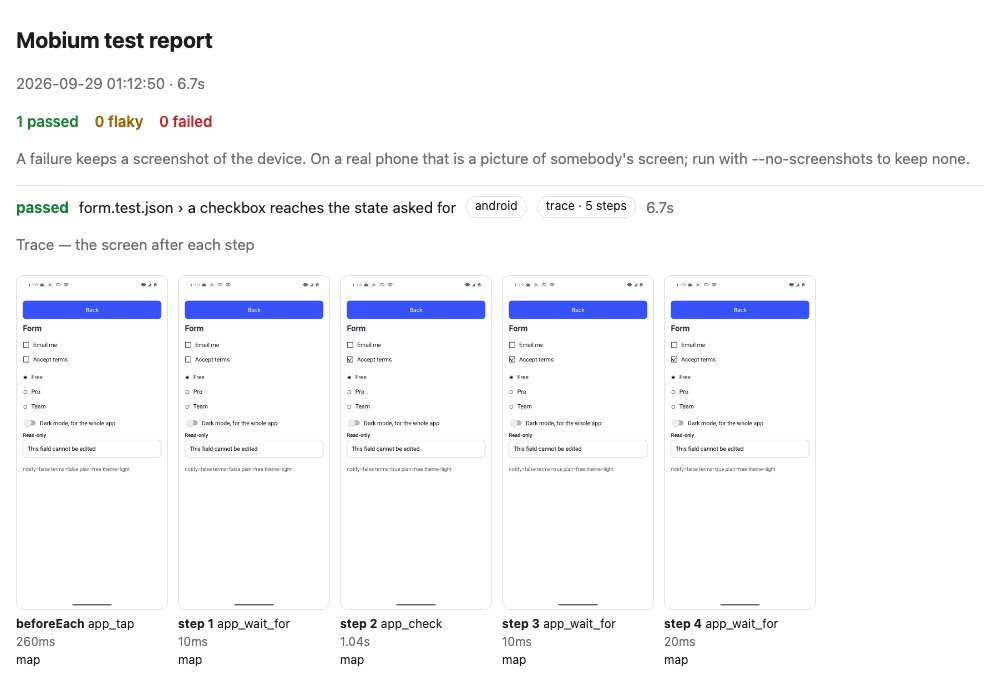
(The report's path is shortened, and the test opened.) A traced run takes its
steps one at a time, where an untraced one batches them, and waits for the
screen to stop changing before each frame — so it is slower, and off by
default. With --no-screenshots a trace keeps the maps and no picture, which
is the setting for somebody's phone.
Stepping through a test
--debug stops before every step, prints it and the screen, and waits:
Enter runs the step, m maps again, c runs the rest of the test, q
quits. One project at a time, and the test's timeout is off while you read.
$ mobium test mobiumapp/form.test.json -g checkbox --project android --debug

[android] form.test.json › a checkbox reaches the state asked for — beforeEach
  {"arguments":{"target":"label=Form Demo"},"name":"app_tap"}

@e1 homeList (list)
@e2 WebViews (button)
@e3 Login Demo (button)
…
@e13 Dialog Demo (button)

Enter runs it · m maps again · c runs the rest of the test · q quits >
[android] form.test.json › a checkbox reaches the state asked for — step 1
  {"arguments":{"condition":"unchecked","target":"testid=termsCheck"},"name":"app_wait_for"}

@e1 Back (button)
@e2 Email me (checkbox, unchecked)
@e3 Accept terms (checkbox, unchecked)
…
(Maps trimmed.) The step is printed in the long form, whichever form the file
used. Quitting reports the test stopped and runs nothing after it; closed
input — a pipe that ends — runs the rest rather than wait.
9. One test over several cases: each
A test with "each" runs once per case, as a test of its own. ${key} in
any string of its steps is that case's value; a string that is nothing but
${key} keeps the value's type, so a count stays a number. $${ writes a
literal ${.
{"name": "a bad sign-in is refused, and says why: ${why}",
 "each": [
   {"why": "a wrong password", "pass": "wrongpass1", "error": "loginError"},
   {"why": "a short password", "pass": "abc", "error": "passError"}
 ],
 "steps": [
   {"fill": {"target": "testid=password", "text": "${pass}"}},
   {"tap": "testid=loginBtn"},
   {"wait_for": {"target": "testid=${error}", "condition": "visible"}}
 ]}
With a ${key} in its name, each case is named by it; without one, the
cases are numbered — [1], [2] — rather than named after values that may
be a password. A key a case does not have is refused when the file is read,
before anything runs.
10. A page to run tests from: --ui
mobium test --ui --open
serves a page on this machine that lists the suite by file, with each test's
result on each project. ▶ runs one test, a file, or everything; each step
appears with the screen after it as it runs, and Re-run failed runs
exactly what failed. The files are read again for every run, so a test you
just saved is the test that runs. A run from the page is the run mobium test makes from the same config and flags, and writes the same reports. The
page answers only its own address with the token it prints, as mobium inspect's does.
Writing tests
- Find targets with
mapfirst.mobium mapon the screen you are testing gives each element's locator;testid=is the one that survives a translation and a redesign. - Assert with
app_wait_for, never a sleep.--forin the CLI isconditionin a step:visible,hidden,text(withexact),value,enabled,disabled,checked,unchecked,focused,count, and"not": truefor the opposite. The auto-wait guide has the table. - Assert on anything else with
expect: a tool that only reads, a field of its answer, and the value —app_state'sstate,app_network'sonline,app_accessibility'ssettings.bold_text. A call that changes something is refused, because anexpectrepeats its call until it matches. - Answer the dialogs a platform raises with a rule in
beforeEach:{"name": "app_dialogs", "arguments": {"when": "Save Password", "press": "Not Now"}}answers iOS's offer to save a password, and never fires on Android, where it never comes. - Keep platform differences out of the steps. Pressing enter in MobiumApp's password field submits the form on iOS and not on Android; a test that pressed it signed in twice on one platform. Tap the button.
- A test is a unit. Tests in a file run in order on one device, but each starts from a fresh app, so none may depend on another.
The commands
| Command | What it does |
|---|---|
mobium test | runs every *.test.json under the config's testDir, on every project |
mobium test tests/login.test.json | runs one file, or every file under a directory |
mobium test -g login | runs the tests whose title — "file › name" — matches a regular expression |
mobium test --last-failed | runs only the tests that failed last time |
mobium test --project android | runs on the named projects only |
mobium test --workers 4 | how many devices run at once — at most one per device |
mobium test --retries 2 | runs a failed test again, up to twice; a pass after a failure is flaky; retries in the config sets the default |
mobium test --timeout 30s | the time for each test; timeout in the config is milliseconds |
mobium test --reporter list,json,junit,html | which reports to write, comma-separated |
mobium test --config ci.config.json | uses this config, not mobium.config.json here or above |
mobium test --output out | where reports go; mobium-report beside the config by default, outputDir in the config |
mobium test --list | lists the tests a run would cover, and runs nothing |
mobium test --no-screenshots | keeps no screenshot of a failure, and a trace keeps only the maps |
mobium test --trace on | a screenshot and the map after every step, and the test as a recording in Vibium's record format that player.vibium.dev opens; retain-on-failure keeps a failed test's only |
mobium test --debug | stops before each step: Enter steps, m maps again, c continues, q quits |
mobium test --ui | serves a page to pick, run and watch tests (--open, --ui-port) |
mobium show-report | opens the last HTML report |
Recording a test from what you do is mobium inspect: what
you do on its page is kept as steps, and downloads as a *.test.json.