Quick start: Python
Start a session on a device, launch Settings, tap a row, take a screenshot, and quit — from Python. Starts with start(platform=..., app=...); ends with device.quit(), or leaving the with block.
Before this page: install mobium and prepare a device.
1. What you need
Python 3.9 or later.
2. Install the client
Not on PyPI yet — pip installs it straight from GitHub, which needs git on your PATH. After the first release this becomes pip install mobium.
mkdir quickstart && cd quickstart
python3 -m venv .venv
.venv/bin/pip install "mobium @ git+https://github.com/mobiumdev/mobium.git#subdirectory=clients/python"
3. The code
Save this as quickstart.py in the project folder — it is examples/python/quickstart.py.
"""Mobium quick start: start a session, drive Settings, quit.

    MOBIUM_PLATFORM=android python3 quickstart.py    # or ios
"""
import os

from mobium import start

# Settings is on every emulator, simulator and phone, with nothing to install.
PLATFORMS = {
    "android": {"app": "com.android.settings", "row": "Network & internet", "next": "text=Airplane mode"},
    "ios": {"app": "com.apple.Preferences", "row": "General", "next": "label=About,role=button"},
}
platform = os.environ.get("MOBIUM_PLATFORM", "android")
p = PLATFORMS[platform]

# 1. Start the session: the driver is started on the device and Settings is
#    launched. The with block quits the session when it ends, even on an error.
with start(platform=platform, app=p["app"], device=os.environ.get("MOBIUM_DEVICE")) as device:
    s = device.session
    print(f"session on {s.device} ({s.platform}, {s.driver})")

    # 2. Map the screen: every element you can act on, each with a @ref.
    elements = device.map()
    for e in elements[:5]:
        print(" ", e)

    # 3. Tap a row by its ref, then wait for the screen it opens. A row's label
    #    can carry its summary too ("Network & internet Mobile, Wi-Fi, ..."),
    #    so match its start.
    row = next(e for e in elements if e.label.startswith(p["row"]))
    device.tap(row.ref)
    device.wait_for(p["next"])
    print(f"opened {p['row']}")

    # 4. Take a screenshot.
    device.screenshot(f"quickstart-{platform}.png")
    print(f"saved quickstart-{platform}.png")

# 5. The with block has quit: the device's session is closed.
print("session ended")
Settings is on every Android and iOS device with nothing to install. The row and the screen after it are the only things that differ by platform.
4. Run it
Android
MOBIUM_PLATFORM=android .venv/bin/python quickstart.py
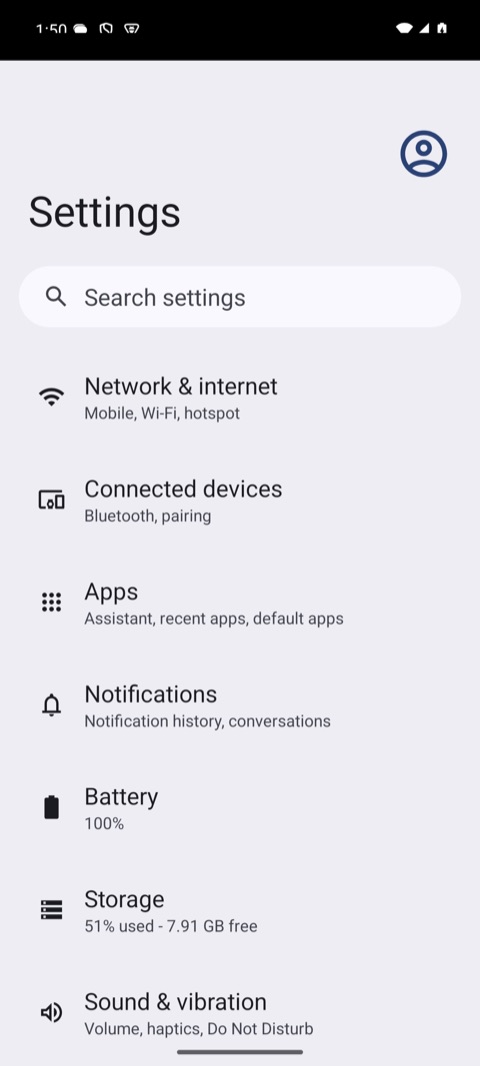
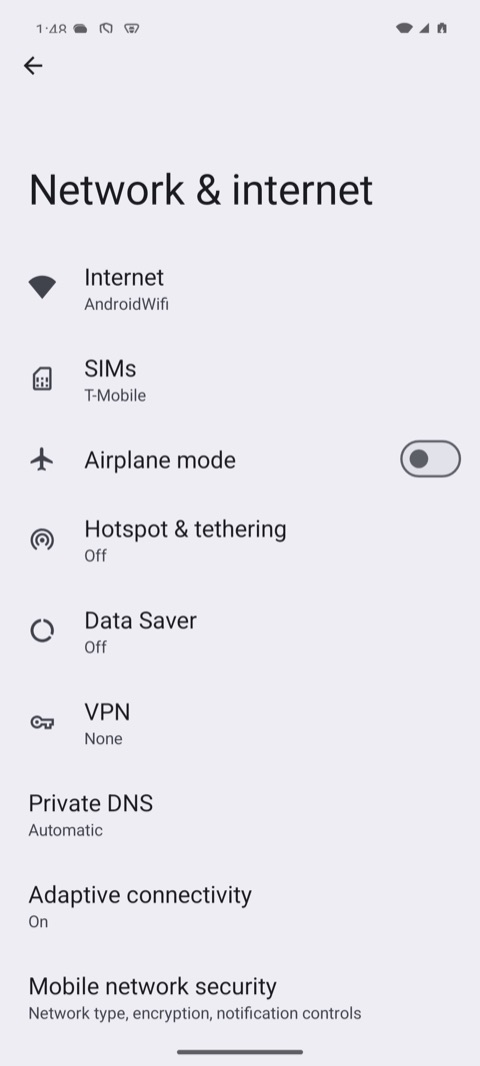
What it printed on an Android 15 emulator:
waiting for the UiAutomator2 server to start...
session on emulator-5554 (android, uiautomator2)
  @e1 settings_homepage_container (list)
  @e2 Profile picture, double tap to open Google Account (button)
  @e3 Search settings (button)
  @e4 main_content_scrollable_container (list)
  @e5 Network & internet Mobile, Wi‑Fi, hotspot (button)
opened Network & internet
saved quickstart-android.png
session ended
| After start | After the tap |
|---|---|
 |  |
iOS
MOBIUM_PLATFORM=ios .venv/bin/python quickstart.py
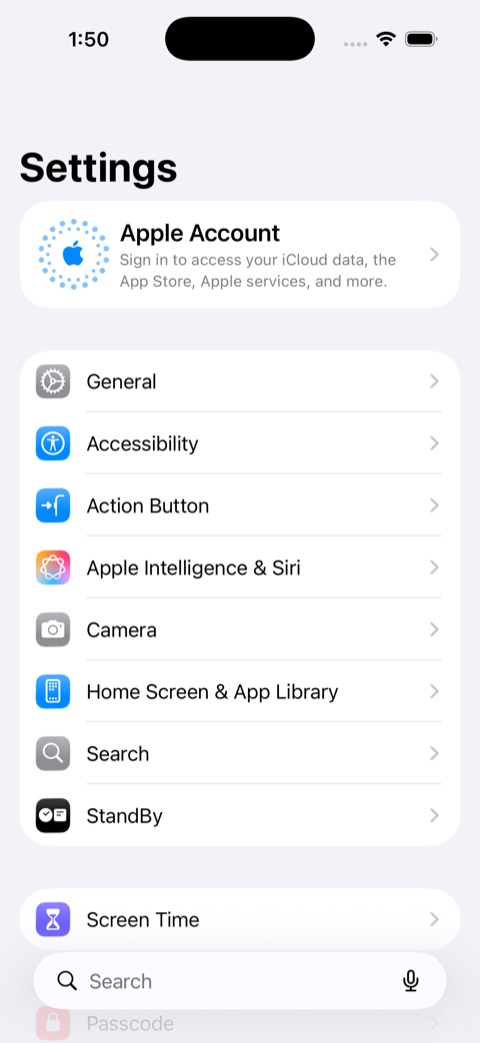
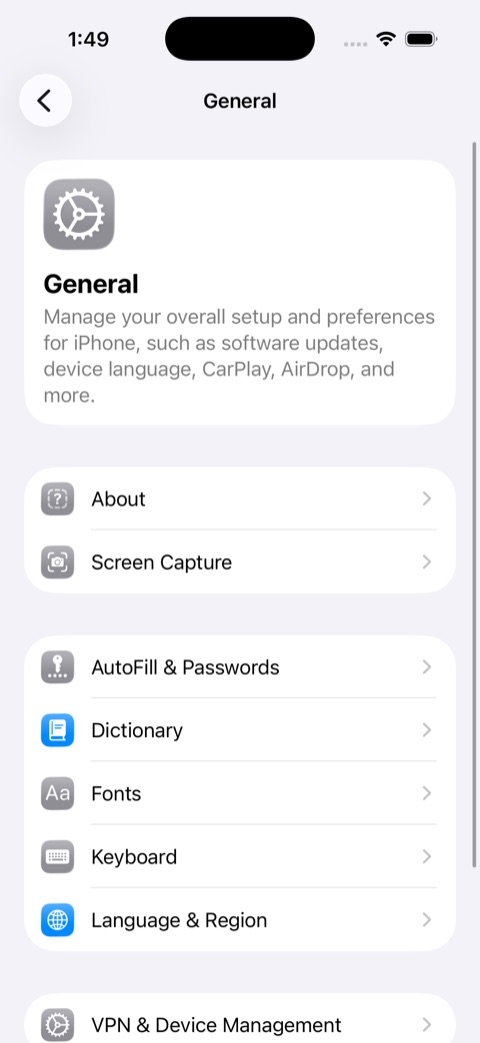
What it printed on an iOS 26.5 simulator:
waiting for WebDriverAgent to start...
session on 457C7DC2-C706-45D9-8D68-1D26953E28B1 (ios, wda)
  @e1 Apple Account, Sign in to access your iCloud data, the App Store, Apple services, and more. (button)
  @e2 General (button)
  @e3 Accessibility (button)
  @e4 Action Button (button)
  @e5 Apple Intelligence & Siri (button)
opened General
saved quickstart-ios.png
session ended
| After start | After the tap |
|---|---|
 |  |
The first start on a device is slow: it installs the UiAutomator2 server on Android, and on a real iPhone builds WebDriverAgent. Later starts take seconds.
Notes
with start(...) as device:quits when the block ends, even on an exception. Withoutwith, calldevice.quit()yourself — in afinally.connect()still exists: it opens a connection without touching the device, and itsclose()leaves the session open for whoever started it.- With more than one device of the session's platform running — two Android devices, or two among the booted simulators and attached iPhones —
startrefuses to guess and lists them. One Android device and one iOS device are not ambiguous: the platform picks. Name one withMOBIUM_DEVICE=<serial or UDID>, which the example passes on as the device.
Next: the rest of the tool surface, and setting up phones and simulators. Changing the client itself? DEVELOPMENT.md is the contributor's guide.