mobium dialogs
This tool on every surface: CLI · MCP · Python · JavaScript · Go · Java · .NET
Declare how to answer a dialog that gets in an action's way
With --when and --press, adds a rule: when a dialog whose text contains --when is in the way of an action, press the button captioned --press, confirm the dialog went, and carry on. The action's result says which dialog was answered. With no flags, lists the rules; --clear removes them.
A rule names a button, not accept or dismiss: which button those press differs by platform and by dialog. Captions match ignoring case. Rules last for the daemon, per device.
Usage
mobium dialogs [flags]
Flags
| Flag | Type | Default | What it does |
|---|---|---|---|
--clear | bool | Remove every rule for this device | |
--press | string | Caption of the button to press, ignoring case | |
--when | string | Text the dialog contains, ignoring case |
And the global flags.
Examples
Answer a dialog whenever it gets in the way
mobium dialogs --when "Save password" --press "Not now"
Printed on an Android 15 emulator:
1 dialog rule(s)
  when "Save password": press "Not now"  (answered 0)
Remove every rule
mobium dialogs --clear
Printed on an Android 15 emulator:
no dialog rules
More, from mobium dialogs --help
mobium dialogs --when "Save Password" --press "Not Now"
mobium dialogs --when "to use your location" --press "Allow While Using App"
mobium dialogs
mobium dialogs --clear
On a device
| Before | After |
|---|---|
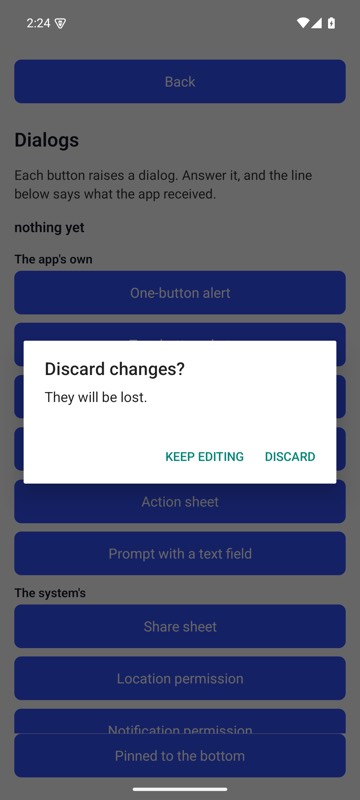 | 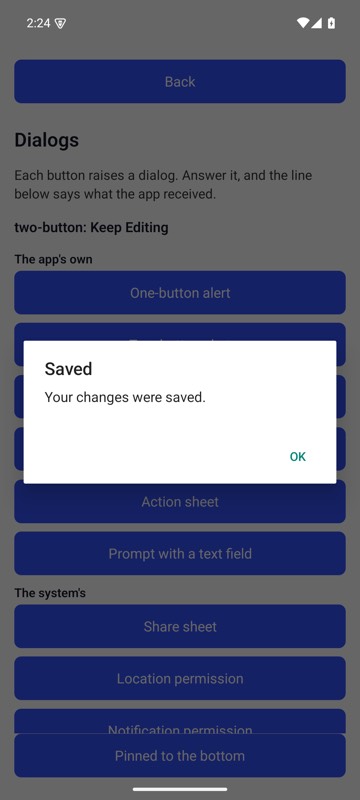 |
With mobium dialogs --when "Discard changes" --press "Keep Editing" declared, mobium tap testid=oneButtonBtn met the Discard dialog in its way, pressed Keep Editing, and went on — its own alert is up, and the line under the title says what the app received — on an Android 15 emulator
The tool
dialogs calls app_dialogs; its arguments and what every client calls it are there.