mobium inspect
See the screen, the locator for anything on it, and record what you do as a test
Serves a page on this machine showing the device's screen with every element map finds outlined. Click one for its locator — the one a test should name it by — and act on it: tap, type, check, wait for it. Type a locator to see what it matches. What you do is kept as steps, and downloads as a *.test.json that mobium test runs. It calls the same tools as every command, through the same daemon, so a terminal and the page drive one session.
It listens on 127.0.0.1 only, and answers only requests carrying the token in the URL it prints — any other page in the browser can reach 127.0.0.1. See docs/guides/inspector.md.
Usage
mobium inspect [flags]
Flags
| Flag | Type | Default | What it does |
|---|---|---|---|
--open | bool | open the page in the browser | |
--port | int | port on 127.0.0.1 (default: any free one) |
And the global flags.
Examples
Open the inspector on the device in front
mobium inspect --open
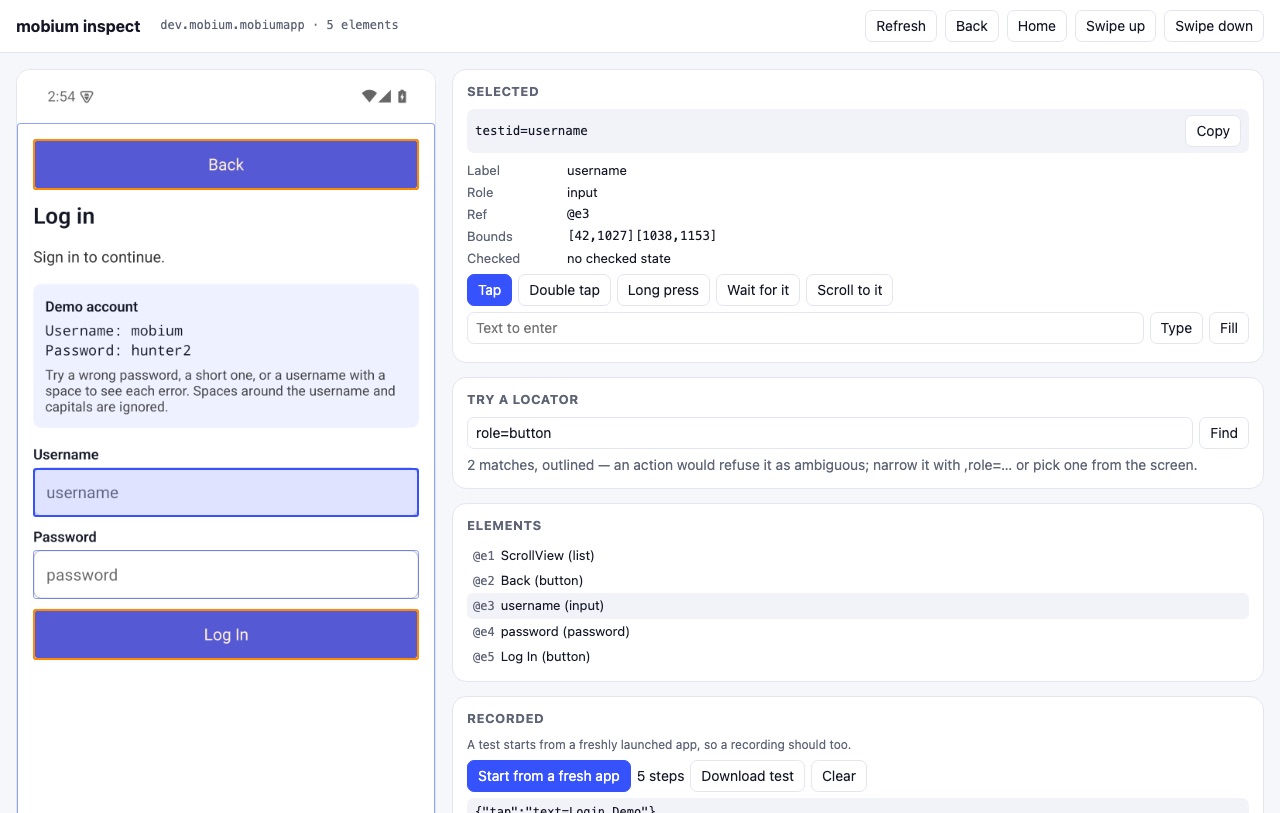
The inspector's page: the screen on the left, what is on it on the right, the locator map would give for anything clicked, and the steps done so far as a mobium test file — from the inspector guide
More, from mobium inspect --help
mobium inspect                       # the only device running
mobium inspect --device emulator-5554 --open
mobium inspect --driver wda --device <simulator-udid>