mobium location
This tool on every surface: CLI · MCP · Python · JavaScript · Go · Java · .NET
Read where the device thinks it is, or move it
With no arguments, prints the device's position and whether that fix was injected.
A negative coordinate looks like a flag to any POSIX command line, so --lat and --lon are the forms that always work; the positional pair is a convenience that handles a negative longitude but not a negative latitude. This is why the examples below use the flags.
The platforms differ and mobium says how. Android sets through a test
provider, reads the position back, and labels it mock — so a set is
confirmed, and it works on a real phone as well as an emulator. iOS sets
through simctl and cannot be read at all: simctl location has set,
clear, run and start, and no get. There the answer says the request was
accepted and nothing stronger.
Clearing removes the test provider. It does not clear the device's last known position, which Android caches — so a read straight afterwards still returns the injected fix, and says so.
Usage
mobium location [lat lon] [flags]
Flags
| Flag | Type | Default | What it does |
|---|---|---|---|
--clear | bool | remove the injected position so the device reports its own | |
--gpx | string | a GPX file to follow | |
--lat | float | latitude in degrees, -90 to 90 | |
--lon | float | longitude in degrees, -180 to 180 | |
--speed | float | 15 | meters per second along a route |
And the global flags.
Examples
Put the device in London
mobium location 51.5074 -0.1278
Printed on an Android 15 emulator:
the device is at 51.507400,-0.127800, injected and read back
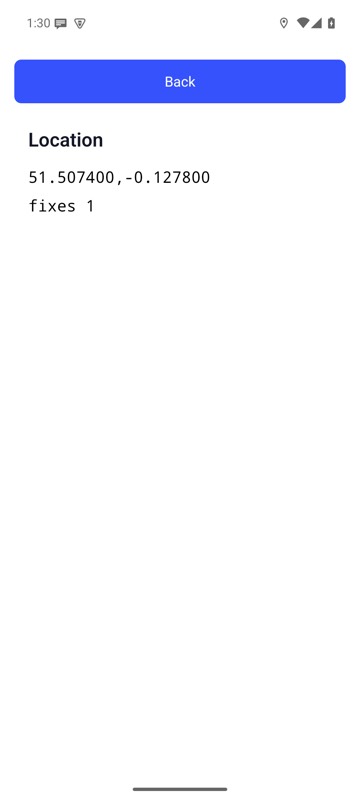
mobium location 51.5074 -0.1278 on an Android 15 emulator
Give it back its own position
mobium location --clear
Printed on an Android 15 emulator:
the test provider is removed — the device will report its own position the next time something asks for one. Its last known location is still the injected one until then; Android keeps that cache and nothing here can clear it
More, from mobium location --help
mobium location                            # where does it think it is?
mobium location --lat 51.5074 --lon -0.1278    # London
mobium location --lat -33.8688 --lon 151.2093  # Sydney
mobium location 51.5074 -0.1278                # the same, positionally
mobium location --gpx walk.gpx --speed 5       # follow a recorded track
mobium location --clear                        # stop pretending, and stop a route
The tool
location calls app_location; its arguments and what every client calls it are there.