mobium map
This tool on every surface: CLI · MCP · Python · JavaScript · Go · Java · .NET
Map actionable elements on screen with @refs
Maps the actionable elements on screen, each with a ref, a label and a role. With --diff, answers only what changed since the last map of this device —
- appeared, - went away, ~ changed label, checked state or place — which is what an action just did. The refs are the new map's either way.
Usage
mobium map [flags]
Flags
| Flag | Type | Default | What it does |
|---|---|---|---|
--diff | bool | Answer only what changed since the last map of this device |
And the global flags.
Examples
Map what can be acted on, with a ref for each
mobium map
Printed on an Android 15 emulator:
@e1 settings_homepage_container (list)
@e2 Profile picture, double tap to open Google Account (button)
@e3 Search settings (button)
@e4 main_content_scrollable_container (list)
@e5 Network & internet Mobile, Wi‑Fi, hotspot (button)
@e6 Connected devices Bluetooth, pairing (button)
@e7 Apps Assistant, recent apps, default apps (button)
@e8 Notifications Notification history, conversations (button)
@e9 Battery 100% (button)
@e10 Storage 51% used - 7.85 GB free (button)
@e11 Sound & vibration Volume, haptics, Do Not Disturb (button)
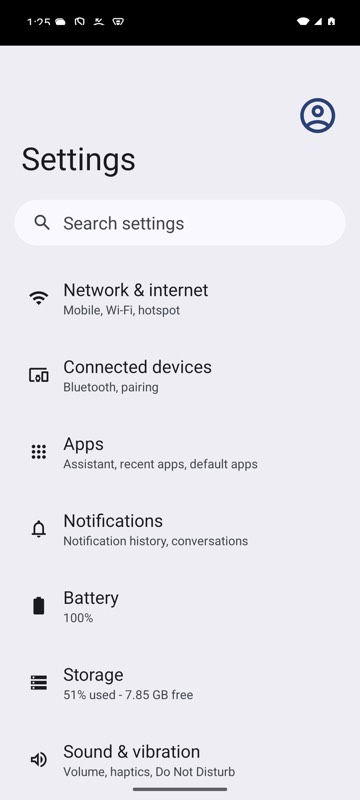
mobium map on an Android 15 emulator
What the last action changed
mobium map --diff
More, from mobium map --help
mobium map
# @e1 Search (input)
# @e2 Sign In (button)
# Use refs with other commands: mobium tap @e2

mobium tap @e2 && mobium map --diff
# + @e9 Welcome, mobium (text)
# - Sign In (button)
# ~ @e3 Accept terms (checkbox, checked) — was unchecked
The tool
map calls app_map; its arguments and what every client calls it are there.