mobium network
This tool on every surface: CLI · MCP · Python · JavaScript · Go · Java · .NET
Read or set network conditions: offline, latency, bandwidth (Android)
With no flags, reports the device's network conditions. --offline turns airplane mode on and waits for the network to go, on an emulator or a real phone; --online turns it off. --latency, --download and --upload shape the traffic on an emulator, replacing any shaping set before. Everything is read back, and the end of the session puts the network back as it was.
Usage
mobium network [flags]
Flags
| Flag | Type | Default | What it does |
|---|---|---|---|
--download | int | Download limit, kbit/s (emulator) | |
--latency | int | Milliseconds added to every round trip (emulator) | |
--offline | bool | Turn airplane mode on, and wait for the network to go | |
--online | bool | Turn airplane mode off, and wait for the network to return | |
--reset | bool | Remove the shaping and turn airplane mode off | |
--upload | int | Upload limit, kbit/s (emulator) |
And the global flags.
Examples
Go offline
mobium network --offline
Printed on an Android 15 emulator:
offline (airplane mode)
| Before | After |
|---|---|
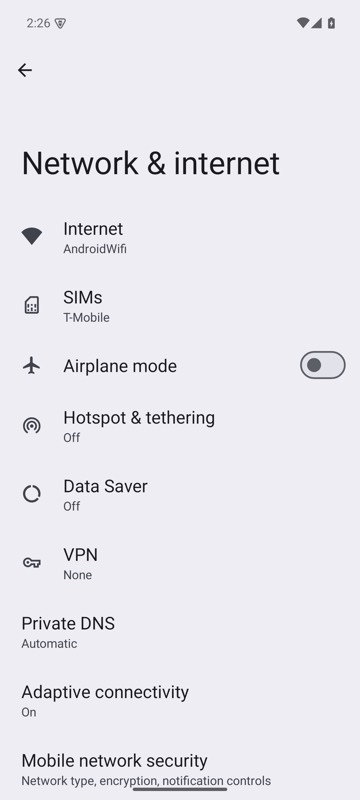 | 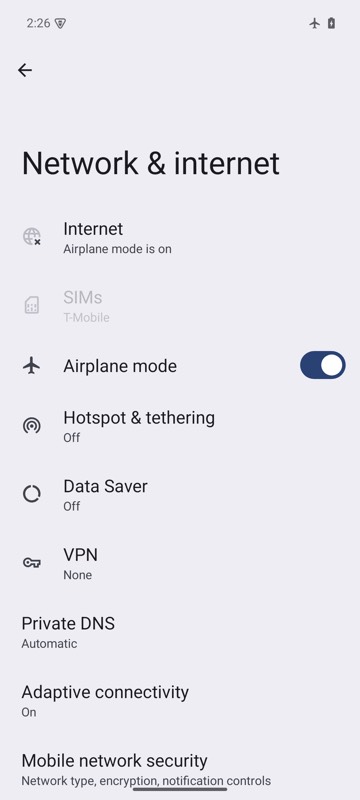 |
mobium network --offline on an Android 15 emulator
A slow connection, on an emulator
mobium network --latency 300 --download 500
Printed on an Android 15 emulator:
online; 300ms added to each round trip, download 500 kbit/s
More, from mobium network --help
mobium network                           # what is in place
mobium network --offline                 # airplane mode, and wait to be offline
mobium network --online
mobium network --latency 300 --download 1600 --upload 750   # a slow 3G
mobium network --reset
The tool
network calls app_network; its arguments and what every client calls it are there.