mobium test
Run *.test.json tests on the devices mobium.config.json names
Runs JSON test files: each test's steps are app_batch steps, its assertions app_wait_for steps and expects, run from a freshly launched app on each project's device. With no files, runs every *.test.json under the config's testDir. With MOBIUM_GRID set, each project leases a device of its own from the grid — by its platform, or its device — for the whole run. Exits 0 when every test passed — a flaky one passes and is listed — and 1 when any failed. See docs/guides/test-runner.md.
Usage
mobium test [file or directory...] [flags]
Flags
| Flag | Type | Default | What it does |
|---|---|---|---|
--config | string | The config to use (default: mobium.config.json here or above) | |
--debug | bool | Stop before each step, show it and the screen, and wait: Enter steps, c continues, q quits | |
--grep -g | string | Run only tests whose title (file › name) matches this regular expression | |
--last-failed | bool | Run only the tests that failed in the last run | |
--list | bool | List the tests that would run, and run nothing | |
--no-screenshots | bool | Keep no screenshot of a failure — on a real phone it is somebody's screen | |
--open | bool | With --ui, open the page in the browser | |
--output | string | Where reports go (default: mobium-report beside the config) | |
--project | strings | Run only these projects, by name (repeat or comma-separate) | |
--reporter | strings | [list] | list, json, junit, html — comma-separate for several |
--retries | int | Run a failed test again this many times; a pass after a failure is flaky | |
--timeout | duration | 1m0s | Time for each test |
--trace | string | "off" | Keep a screenshot and the map after every step, and the test as a recording in Vibium's record format: on, off, or retain-on-failure |
--ui | bool | Serve a page on this machine to pick tests, run them and watch each step (docs/guides/test-runner.md) | |
--ui-port | int | With --ui, the port on 127.0.0.1 (default: any free one) | |
--workers | int | How many devices run at once; at most one per project (default: all) |
And the global flags.
Examples
Run the suite, and write the HTML report
mobium test --reporter list,html
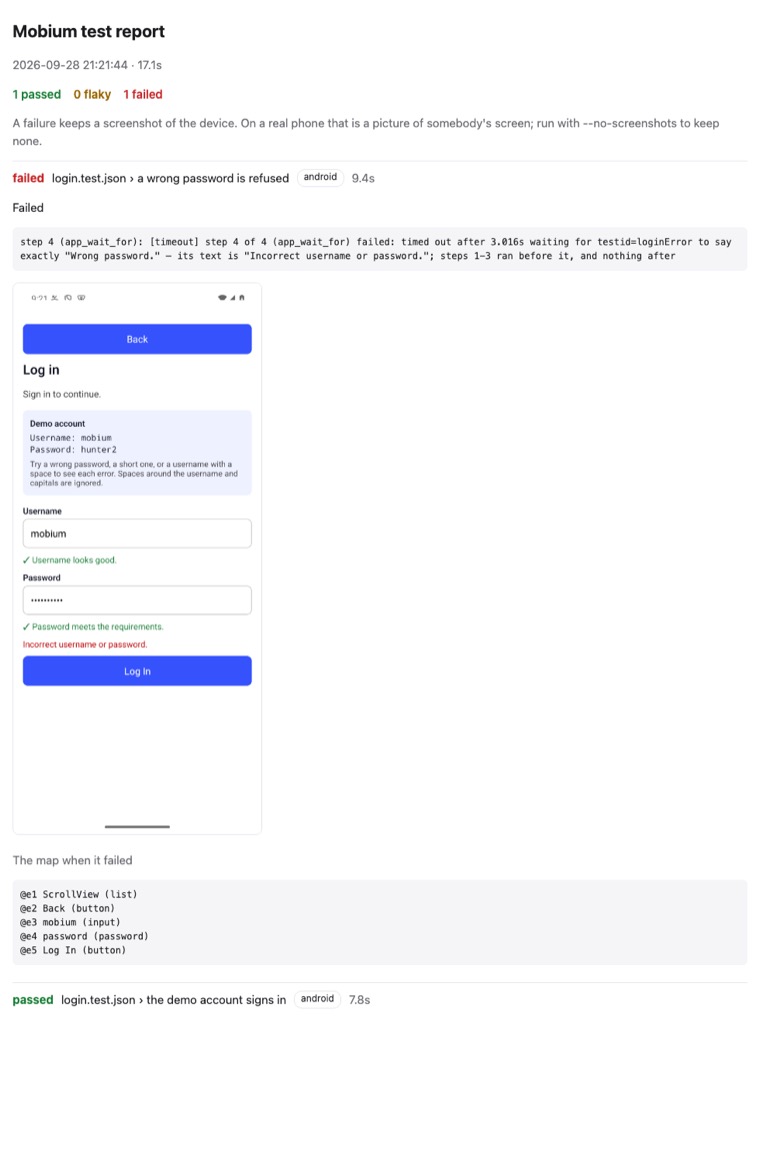
The HTML report of a run with a failure — from the test runner guide
More, from mobium test --help
mobium test                              # everything, every project
mobium test tests/login.test.json
mobium test -g "wrong password"
mobium test --project android --retries 2
mobium test --reporter list,junit,html && mobium show-report
mobium test --last-failed
mobium test --trace retain-on-failure --reporter list,html
mobium test --debug -g "wrong password" --project android
mobium test --ui --open                  # pick, run and watch tests on a page