AddDialogRule · DialogRules · ClearDialogRules
This tool on every surface: CLI · MCP · Python · JavaScript · Go · Java · .NET
Declare how to answer a dialog, so an action that meets it carries on: when a dialog whose text contains when is in the way of a tap, a type or any action with a target, the button captioned press is pressed, the dialog is confirmed gone, and the action continues — and its result says which dialog was answered. These call app_dialogs.
AddDialogRule
public void AddDialogRule(string when, string press)
Declares how to answer a dialog, so an action that meets it carries
on: when a dialog whose text contains when is in
the way, press the button captioned press. It names
a button, not accept or dismiss, because which button those press
differs by platform and by dialog. Captions match ignoring case.
DialogRules
public IList<IDictionary<string, object?>> DialogRules()
The declared rules, each with how often it has answered.
ClearDialogRules
public void ClearDialogRules()
Removes every rule for this device.
Examples
Answer a dialog whenever it gets in the way
device.AddDialogRule("Save password", "Not now");
The same call from the command line, mobium dialogs --when "Save password" --press "Not now", printed on an Android 15 emulator:
1 dialog rule(s)
  when "Save password": press "Not now"  (answered 0)
Remove every rule
device.ClearDialogRules();
The same call from the command line, mobium dialogs --clear, printed on an Android 15 emulator:
no dialog rules
On a device
| Before | After |
|---|---|
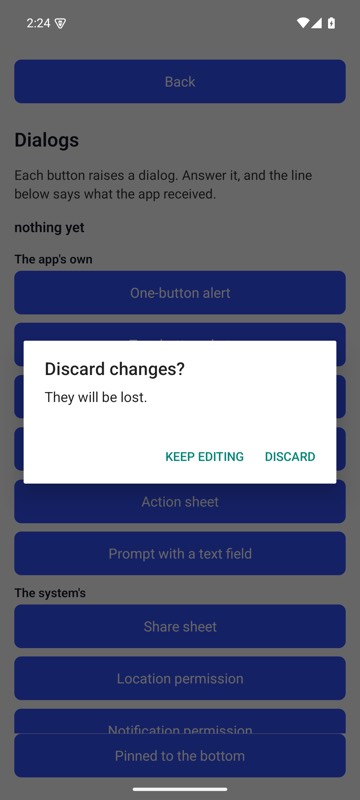 | 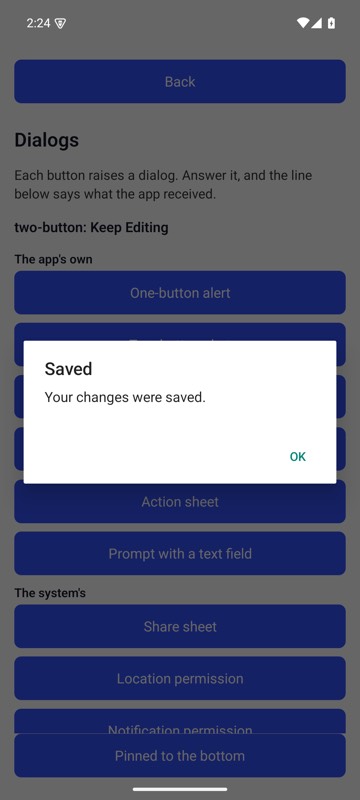 |
With mobium dialogs --when "Discard changes" --press "Keep Editing" declared, mobium tap testid=oneButtonBtn met the Discard dialog in its way, pressed Keep Editing, and went on — its own alert is up, and the line under the title says what the app received — on an Android 15 emulator