Keyboard
This tool on every surface: CLI · MCP · Python · JavaScript · Go · Java · .NET
The soft keyboard: whether it is up and which field has focus, typing at that field's cursor, pressing a named key, or hiding it. These call app_keyboard.
Keyboard
func (d *Device) Keyboard(ctx context.Context, opts KeyboardOptions) (KeyboardState, error)
Keyboard reads, types into, presses a key on, or hides the soft keyboard. It fails with ErrNoSuchElement when text is given and nothing has focus.
Examples
Type into the focused field and press Enter
text := "coffee"
if _, err := dev.Keyboard(ctx, mobium.KeyboardOptions{Text: &text, Key: "enter"}); err != nil {
	return err
}
The same call from the command line, mobium keyboard --text coffee --key enter, printed on an Android 15 emulator:
typed "coffee" into username, which now holds coffee; the keyboard is hidden
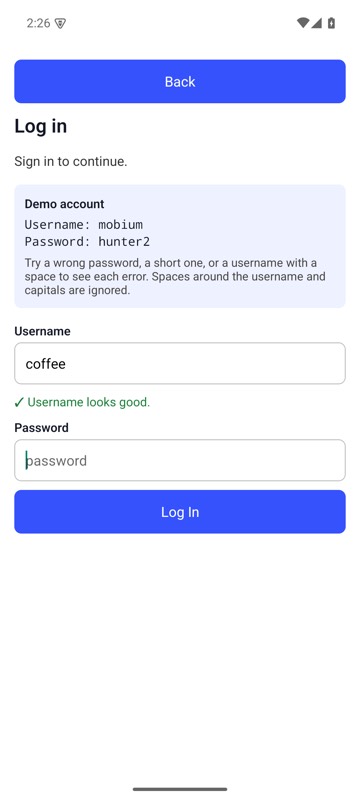
mobium keyboard --text coffee --key enter on an Android 15 emulator
Hide the keyboard
state, err := dev.Keyboard(ctx, mobium.KeyboardOptions{Hide: true})
if err != nil {
	return err
}
fmt.Println("shown:", state.Shown)
The same call from the command line, mobium keyboard --hide, printed on an Android 15 emulator:
hid the keyboard
| Before | After |
|---|---|
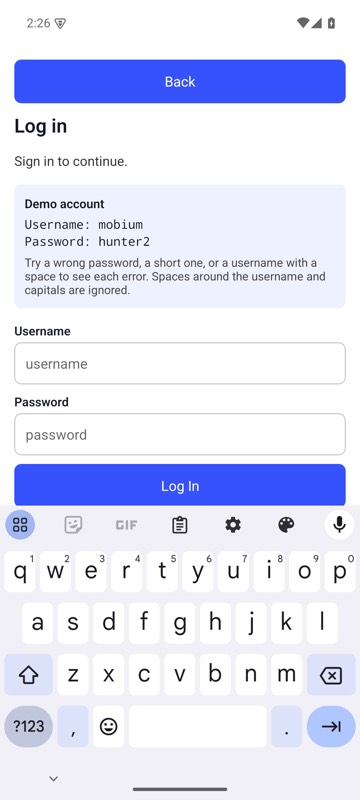 | 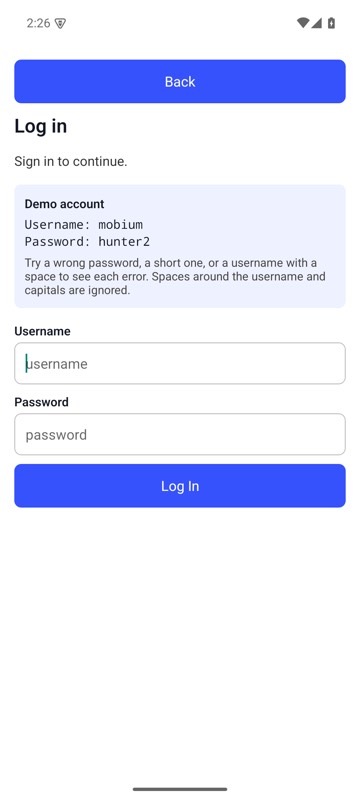 |
mobium keyboard --hide on an Android 15 emulator