Map · MapDiff
This tool on every surface: CLI · MCP · Python · JavaScript · Go · Java · .NET
Map the actionable elements on the current screen and return them as refs (@e1, @e2, ...) with a label and role. These call app_map.
Map
func (d *Device) Map(ctx context.Context) ([]Element, error)
Map returns the actionable elements on the current screen.
Refs are only valid for this screen; call Map again after anything that changes it, or just act — actions re-resolve their target anyway.
MapDiff
func (d *Device) MapDiff(ctx context.Context) (*MapDiff, error)
MapDiff maps the current screen and reports what changed since the last map of this device, which it then replaces: the next MapDiff compares with this one.
Examples
Map what can be acted on, with a ref for each
elements, err := dev.Map(ctx)
if err != nil {
	return err
}
for _, el := range elements {
	fmt.Println(el.Ref, el.Role, el.Label)
}
The same call from the command line, mobium map, printed on an Android 15 emulator:
@e1 settings_homepage_container (list)
@e2 Profile picture, double tap to open Google Account (button)
@e3 Search settings (button)
@e4 main_content_scrollable_container (list)
@e5 Network & internet Mobile, Wi‑Fi, hotspot (button)
@e6 Connected devices Bluetooth, pairing (button)
@e7 Apps Assistant, recent apps, default apps (button)
@e8 Notifications Notification history, conversations (button)
@e9 Battery 100% (button)
@e10 Storage 51% used - 7.85 GB free (button)
@e11 Sound & vibration Volume, haptics, Do Not Disturb (button)
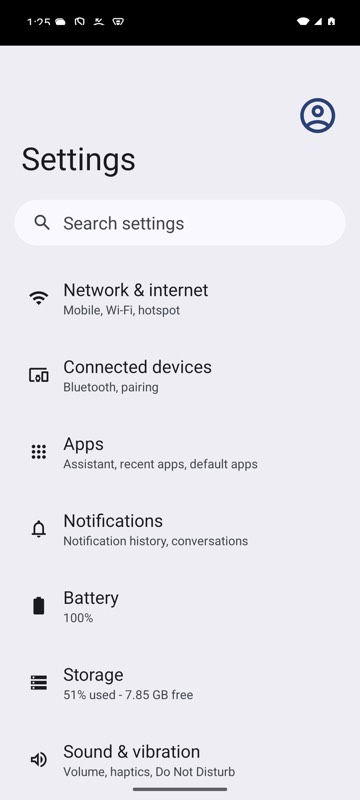
mobium map on an Android 15 emulator
What the last action changed
diff, err := dev.MapDiff(ctx)
if err != nil {
	return err
}
for _, e := range diff.Added {
	fmt.Println("+", e.Ref, e.Label)
}
for _, c := range diff.Changed {
	fmt.Println("~", c.After.Ref, c.After.Label, c.What)
}