download · pullPath · downloads
This tool on every surface: CLI · MCP · Python · JavaScript · Go · Java · .NET
Bring back a file from where the device keeps downloads — Android's shared Download folder, or on iOS an app's own Documents — to check what an app saved. These call app_download.
download
public Map<String, Object> download(String name, String path)
public Map<String, Object> download(String name, String path, String app)
public byte[] download(String name)
Brings a file back from where the device keeps downloads — Android's shared Download folder, or on iOS the Documents of the app in front — and saves it on this machine. The copy's size is read back against the device's, a real iPhone's included. A relative path is this process's.
@param name the file's name in the folder, as downloads() lists it
@param path where to save it on this machine
@return the absolute path it was saved to, where it came from, its bytes, and how it was checked
Brings a file back from a named app's Documents on iOS and saves it on
this machine. Android ignores the app. See download(String, String).
@param name the file's name in the folder
@param path where to save it on this machine
@param app the bundle id whose Documents to read (iOS)
@return the absolute path it was saved to, where it came from, its bytes, and how it was checked
Brings a file back from where the device keeps downloads and returns
its contents, which arrive in the answer as base64. See
download(String, String).
@param name the file's name in the folder @return the file's bytes
pullPath
public Map<String, Object> pullPath(String devicePath, String path)
public Map<String, Object> pullPath(String devicePath, String path, String app)
Brings back the file or folder at a path on the device — the paths
pushPath(String, String) takes — and checks every file's size.
@param devicePath the file or folder on the device
@param path where to save it; a folder needs one that does not exist yet
@return the transfer, with files and folder
As pullPath(String, String), from inside an app.
@param devicePath the file or folder, inside the app
@param path where to save it on this machine
@param app the package or bundle id
@return the transfer, with files and folder
downloads
public List<Map<String, Object>> downloads()
public List<Map<String, Object>> downloads(String app)
What the device's download folder holds: Android's shared Download
folder, or on iOS the Documents of the app in front. Each map has
name, bytes and modified. A real iPhone
answers the same.
@return each file in the folder
What a named app's Documents hold on iOS. Android has one Download
folder for every app and ignores the app. See downloads().
@param app the bundle id whose Documents to list (iOS) @return each file in the folder
Examples
Bring back a file an app saved
Map<String, Object> saved = device.download("mobium-report.txt", "report.txt");
System.out.println(saved.get("path"));

// Or the file itself, as bytes
byte[] report = device.download("mobium-report.txt");
The same call from the command line, mobium download mobium-report.txt -o report.txt, printed on an Android 15 emulator:
downloaded mobium-report.txt from Download/mobium-report.txt to …/report.txt (44 bytes) — confirmed by the copy's size read back against the device's
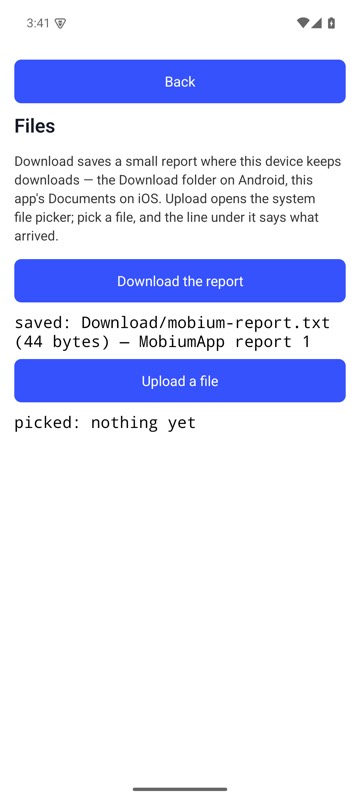
The Files Demo's Download the report saved mobium-report.txt in the Download folder, and the line under it says how big and which save it was; mobium download brought that file back — on an Android 15 emulator
List what the folder holds
for (Map<String, Object> f : device.downloads()) {
    System.out.println(f.get("name") + " " + f.get("bytes"));
}
The same call from the command line, mobium download, printed on an Android 15 emulator:
the Download folder holds 1 file
  mobium-report.txt                                44 bytes  2026-09-29 03:41
Bring back a folder from a path on the device
Map<String, Object> got = device.pullPath("/sdcard/seed", "seed-copy");
System.out.println(got.get("files") + " " + got.get("path"));
The same call from the command line, mobium download --device-path /sdcard/seed -o seed-copy, printed on an Android 15 emulator:
downloaded seed from /sdcard/seed to …/seed-copy (a folder of 2 files, 8 bytes) — confirmed by each of its 2 files' sizes read back against the device's