network · setOffline · shapeNetwork · resetNetwork
This tool on every surface: CLI · MCP · Python · JavaScript · Go · Java · .NET
Read or set the device's network conditions: offline, latency and bandwidth. These call app_network.
network
public Map<String, Object> network()
The network: airplane, online, and the shaping —
latency_ms, download_kbps, upload_kbps, zero for
none. Android only.
@return the network, read from the device
setOffline
public Map<String, Object> setOffline(boolean offline)
Turns airplane mode on or off and waits for the network to follow — on an emulator or a real Android phone.
@param offline true for airplane mode @return the network, read back
shapeNetwork
public Map<String, Object> shapeNetwork(int latencyMs, int downloadKbps, int uploadKbps)
Adds latency to each round trip and limits download and upload, in kbit/s, replacing any shaping set before; zero is none. Needs root, so an emulator.
@param latencyMs milliseconds added to each round trip @param downloadKbps the download limit @param uploadKbps the upload limit @return the network, read back
resetNetwork
public Map<String, Object> resetNetwork()
Removes the shaping and turns airplane mode off.
@return the network, read back
Examples
Go offline
Map<String, Object> network = device.setOffline(true); // read back once airplane mode holds
The same call from the command line, mobium network --offline, printed on an Android 15 emulator:
offline (airplane mode)
| Before | After |
|---|---|
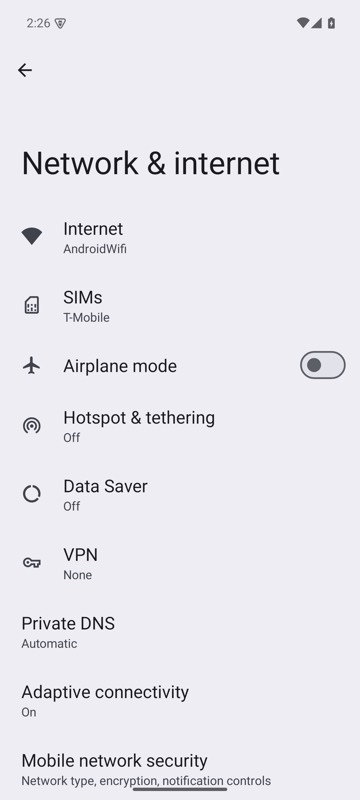 | 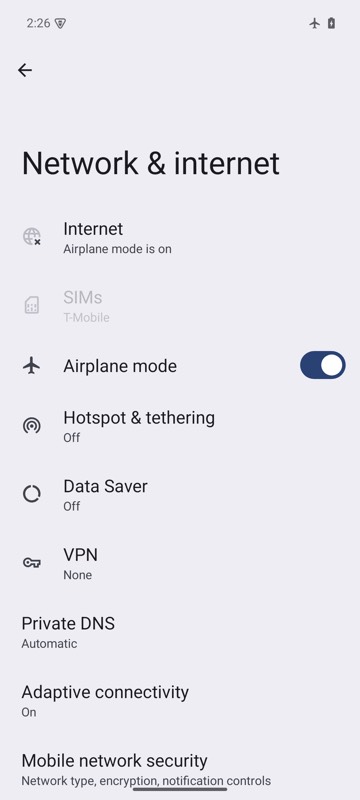 |
mobium network --offline on an Android 15 emulator
A slow connection, on an emulator
device.shapeNetwork(300, 500, 0); // 0: no upload limit
The same call from the command line, mobium network --latency 300 --download 500, printed on an Android 15 emulator:
online; 300ms added to each round trip, download 500 kbit/s