speech · listenStart · listenStop
This tool on every surface: CLI · MCP · Python · JavaScript · Go · Java · .NET
What the screen reader says — VoiceOver on a real iPhone (iOS 27, a runner built by Xcode 27), TalkBack on Android. These call app_speech.
speech
public Map<String, Object> speech(String target, boolean walk, int limit)
What the screen reader says: VoiceOver on a real iPhone, TalkBack on
Android. The screen reader must be on. The answer holds the
screen_reader and its steps, each the sentence
said and the element it was said about when that can
be told; a walk also says why it ended.
@param target an element to put the cursor on first, or null for wherever it is @param walk whether to move forward through the screen, reporting each sentence @param limit the most moves a walk makes; 0 is 40 @return the screen reader, and what it said about what
listenStart
public Map<String, Object> listenStart()
Starts listening to what the screen reader says, before an action.
@return that it is listening
listenStop
public Map<String, Object> listenStop()
Stops listening, after an action: waits for the screen reader to go quiet and
answers with every sentence it said since listenStart(), each
step with its cause on Android — focus, announcement or
change.
@return what TalkBack said while listening
Examples
Say what the screen reader says about the element its cursor is on
Map<String, Object> said = device.speech(null, false, 0);
System.out.println(said.get("steps"));
The same call from the command line, mobium speech, printed on an Android 15 emulator:
TalkBack says: "not checked. Pro. Radio button" — Pro (radio)
Walk the screen in the screen reader's order, each sentence beside its element
Map<String, Object> walk = device.speech(null, true, 20);
System.out.println(walk.get("steps") + " ended " + walk.get("ended"));
The same call from the command line, mobium speech --walk --limit 20, printed on an Android 15 emulator:
TalkBack says:
  1. "not checked. Team. Radio button" — Team (radio)
  2. "OFF. Dark mode. Switch" — Dark mode (switch)
  3. "Dark mode, for the whole app" — Dark mode, for the whole app, not in map
  4. "Read-only" — Read-only, not in map
  5. "This field cannot be edited. Edit box. disabled"
  6. "notify=false terms=false plan=free theme=light" — notify=false terms=false plan=free theme=light, not in map
  7. (nothing)
  8. "Back. Button" — Back (button)
  9. "Form" — Form, not in map
 10. "not checked. Email me. Check box" — Email me (checkbox)
 11. "not checked. Accept terms. Check box" — Accept terms (checkbox)
 12. "checked. Free. Radio button" — Free (radio)
 13. "not checked. Pro. Radio button" — Pro (radio)
ended: the cursor came back round to the first element
Put the screen reader's cursor on an element, and hear what it says
Map<String, Object> said = device.speech("label=Pro", false, 0);
System.out.println(said.get("steps"));
The same call from the command line, mobium speech label=Pro, printed on an Android 15 emulator:
TalkBack says: "not checked. Pro. Radio button" — Pro (radio)
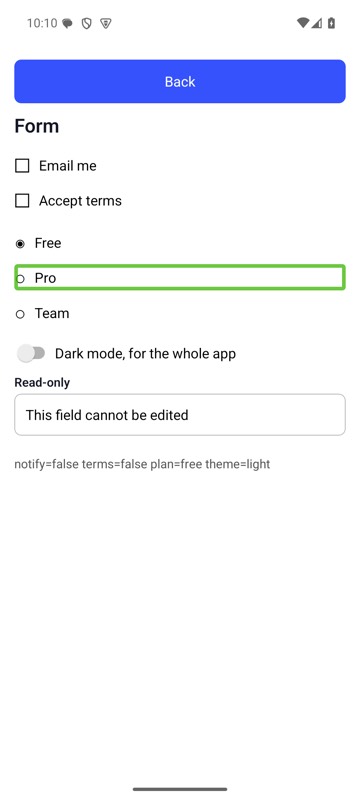
mobium speech label=Pro on an Android 15 emulator
Start listening to the screen reader, before an action
device.listenStart();
device.tap("testid=addLive");
The same call from the command line, mobium speech --listen start, printed on an Android 15 emulator:
listening to TalkBack — act, then stop it with listen stop
Stop listening, and hear what the action made it say
Map<String, Object> heard = device.listenStop();
System.out.println(heard.get("steps"));
The same call from the command line, mobium speech --listen stop, printed on an Android 15 emulator:
TalkBack said, since listening started: "Live cart: 1" — Live cart: 1, not in map [a change on screen]