upload · pushPath
This tool on every surface: CLI · MCP · Python · JavaScript · Go · Java · .NET
Put a file from this machine where the device keeps downloads, so an app's file picker finds it: Android's shared Download folder, or on iOS an app's own Documents folder, which the Files app shows under On My iPhone. These call app_upload.
upload
public Map<String, Object> upload(String path)
public Map<String, Object> upload(String path, String name)
public Map<String, Object> upload(String path, String name, String app)
Puts a local file where the device keeps downloads, under its own name,
so an app's file picker finds it: Android's shared Download folder, or
on iOS the Documents folder of the app in front, which the Files app
shows under On My iPhone. Android's picker reads MediaStore rather than
the folder, so the file is indexed and read back there; checked
says how it was confirmed. On a real iPhone it is the same folder,
and the upload is confirmed by reading its bytes back. A relative
path is this process's.
@param path the file on this machine to upload
@return the name it was given, where it went, its bytes, and how it was checked
Puts a local file where the device keeps downloads, under the name
given. See upload(String).
@param path the file on this machine to upload
@param name the name to give it on the device — a name, not a path
@return the name it was given, where it went, its bytes, and how it was checked
Puts a local file into a named app's Documents on iOS. Android has one
Download folder for every app and ignores the app, so a test written
for both platforms can name it on both. Pass null for the file's own
name. See upload(String).
@param path the file on this machine to upload
@param name the name to give it on the device, or null for the file's own
@param app the bundle id whose Documents it goes to (iOS)
@return the app, the name it was given, where it went, its bytes, and how it was checked
pushPath
public Map<String, Object> pushPath(String local, String devicePath)
public Map<String, Object> pushPath(String local, String devicePath, String app)
Sends a local file or folder to a path on the device and reads every
file's size back there. On Android the path is absolute
(/sdcard/..., /data/local/tmp/...); on iOS it is a path in
the data container of the app in front.
@param local the file or folder on this machine
@param devicePath where it goes on the device
@return the transfer, with files and folder
As pushPath(String, String), into an app: on Android a path in
its private data, which needs a debuggable build; on iOS a path in its
data container.
@param local the file or folder on this machine
@param devicePath where it goes, inside the app
@param app the package or bundle id
@return the transfer, with files and folder
Examples
Send a file where the device keeps downloads
Map<String, Object> sent = device.upload("invoice-42.txt");
System.out.println(sent.get("where") + " " + sent.get("bytes"));
The same call from the command line, mobium upload invoice-42.txt, printed on an Android 15 emulator:
uploaded …/invoice-42.txt to Download/invoice-42.txt (24 bytes) — confirmed by its size read back on the device, and MediaStore listing it
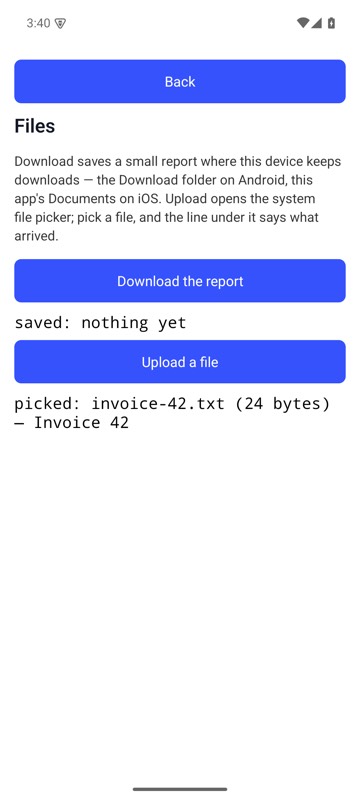
After mobium upload invoice-42.txt, the Files Demo's Upload a file opened the system picker, the file was in it, and the line under the button says the name, size and first line of what arrived — on an Android 15 emulator
Send a folder to a path on the device
Map<String, Object> sent = device.pushPath("seed", "/sdcard/seed");
System.out.println(sent.get("files") + " " + sent.get("checked"));
The same call from the command line, mobium upload ./seed --device-path /sdcard/seed, printed on an Android 15 emulator:
uploaded …/seed to /sdcard/seed (a folder of 2 files, 8 bytes) — confirmed by each of its 2 files' sizes read back on the device