app_batch
This tool on every surface: CLI · MCP · Python · JavaScript · Go · Java · .NET
Run several tools in order, on one device, in one call — a known sequence such as tap, type, tap, without a round trip for each. Every step is the call it would be on its own: {"name": a tool, "arguments": what that tool takes}, resolving its target against a fresh snapshot and waiting as usual. Every step is checked before the first runs — an unknown tool, or an argument its tool does not take, refuses the whole batch with nothing done. It stops at the first failure, which is reported with that step's own error code, its number, and what ran before it; nothing after it runs, because the screen the next step expected is not the one it would meet. The answer lists each step's text and data in order. The device is the batch's: give it here, not per step. A screenshot with no path comes back as an image after the text. Use it for steps whose outcome you do not need to see before choosing the next. A ref means what the last app_map said when its step runs, and an app_map step inside the batch replaces them, so after one prefer locators ("text=Sign in") to refs.
Changes the device, the app or the session: readOnlyHint is false.
Arguments
| Name | Type | Required | What it is |
|---|---|---|---|
device | string | Device serial to target, e.g. "emulator-5554". Omit when only one device is running. | |
driver | string: uiautomator2, uiautomator, wda | Driver to use: "uiautomator2" (default for Android; fast, installs a server APK on first use), "uiautomator" (Android, installs nothing, slower, cannot type), or "wda" (WebDriverAgent: iOS simulators and iPhones). | |
steps | array of object | yes | The calls to make, in order. |
Examples
Each is the arguments of a tools/call request; the first is shown whole.
Tap through two screens in one call
{
  "jsonrpc": "2.0",
  "id": 1,
  "method": "tools/call",
  "params": {
    "name": "app_batch",
    "arguments": {
      "steps": [
        {
          "name": "app_tap",
          "arguments": {
            "target": "text=Network & internet"
          }
        },
        {
          "name": "app_wait_for",
          "arguments": {
            "target": "text=Internet"
          }
        }
      ]
    }
  }
}
On an Android 15 emulator the answer's text was:
1. app_tap: tapped text=Network & internet at (407, 867)
2. app_wait_for: text=Internet is visible after 1.222s — @e3 Internet AndroidWifi (button)
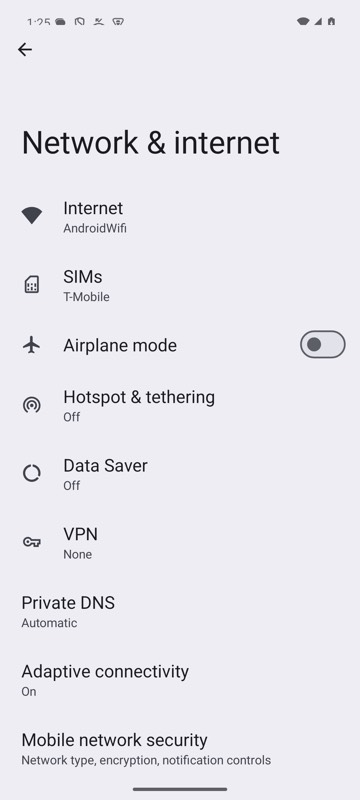
mobium batch steps.json on an Android 15 emulator