app_clipboard
This tool on every surface: CLI · MCP · Python · JavaScript · Go · Java · .NET
Read the device clipboard, or write it by passing text. The platforms are not symmetric. iOS reads and writes through simctl, so a write is confirmed by reading it back. Android can only write: on Android 10 and later reading the clipboard requires the requesting app to have focus, and the UiAutomator2 server has no activity of its own, so it answers with an empty string however full the clipboard is. Reporting that as "empty" would be a different claim and usually a false one, so the read refuses there instead. To check an Android write, paste into a field and read the field.
Changes the device, the app or the session: readOnlyHint is false.
Arguments
| Name | Type | Required | What it is |
|---|---|---|---|
device | string | Device serial to target, e.g. "emulator-5554". Omit when only one device is running. | |
driver | string: uiautomator2, uiautomator, wda | Driver to use: "uiautomator2" (default for Android; fast, installs a server APK on first use), "uiautomator" (Android, installs nothing, slower, cannot type), or "wda" (WebDriverAgent: iOS simulators and iPhones). | |
text | string | Text to put on the clipboard. Omit to read it. |
Examples
Each is the arguments of a tools/call request; the first is shown whole.
Put text on the clipboard
{
  "jsonrpc": "2.0",
  "id": 1,
  "method": "tools/call",
  "params": {
    "name": "app_clipboard",
    "arguments": {
      "text": "hello there"
    }
  }
}
On an Android 15 emulator the answer's text was:
wrote "hello there" to the clipboard — Android cannot read it back, so this is the write reported as sent. Paste into a field to see it
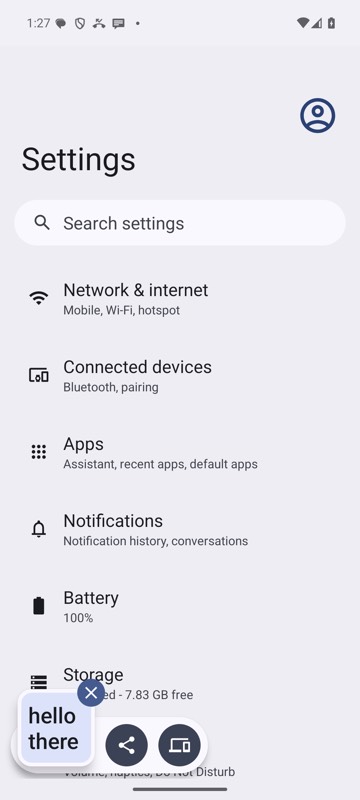
mobium clipboard "hello there" on an Android 15 emulator
Read the clipboard
{}