app_find
This tool on every surface: CLI · MCP · Python · JavaScript · Go · Java · .NET
Find elements matching a locator and return their refs, without tapping. Locator kinds: text, label, testid, role, class, path. Roles: adjustable, button, cell, checkbox, image, input, link, list, password, progressbar, radio, slider, switch, tab, text.
Read-only: readOnlyHint is true.
Arguments
| Name | Type | Required | What it is |
|---|---|---|---|
device | string | Device serial to target, e.g. "emulator-5554". Omit when only one device is running. | |
driver | string: uiautomator2, uiautomator, wda | Driver to use: "uiautomator2" (default for Android; fast, installs a server APK on first use), "uiautomator" (Android, installs nothing, slower, cannot type), or "wda" (WebDriverAgent: iOS simulators and iPhones). | |
locator | string | yes | For example "text=Sign In", "role=button", "testid=submit". |
Examples
Each is the arguments of a tools/call request; the first is shown whole.
Find every button on screen, without tapping
{
  "jsonrpc": "2.0",
  "id": 1,
  "method": "tools/call",
  "params": {
    "name": "app_find",
    "arguments": {
      "locator": "role=button"
    }
  }
}
On an Android 15 emulator the answer's text was:
@e2 Profile picture, double tap to open Google Account (button)
@e3 Search settings (button)
(no ref)  [53,599][200,736]
@e5 Network & internet Mobile, Wi‑Fi, hotspot (button)
@e6 Connected devices Bluetooth, pairing (button)
@e7 Apps Assistant, recent apps, default apps (button)
@e8 Notifications Notification history, conversations (button)
@e9 Battery 100% (button)
@e10 Storage 51% used - 7.85 GB free (button)
@e11 Sound & vibration Volume, haptics, Do Not Disturb (button)
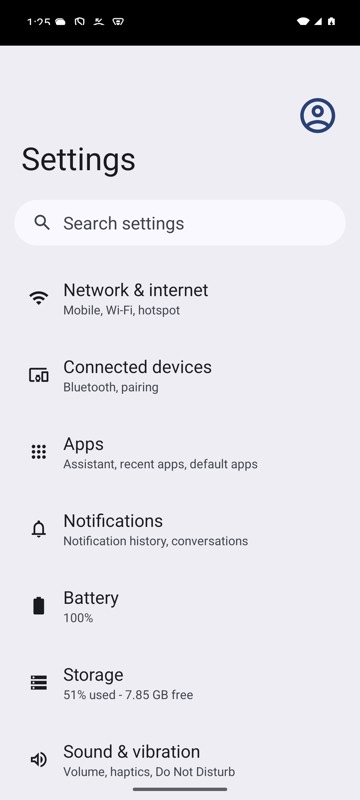
mobium find role=button on an Android 15 emulator