app_network
This tool on every surface: CLI · MCP · Python · JavaScript · Go · Java · .NET
Read or set the device's network conditions: offline, latency, bandwidth and an HTTP proxy. With no arguments, reports what is in place, read from the device. offline switches airplane mode and waits for the device to lose, or regain, its network — on an emulator and on a real Android phone. latency_ms, download_kbps and upload_kbps shape the device's traffic on an emulator (they need root, which a phone does not give); together they replace any shaping set before, and an omitted one is no limit. proxy points the device's HTTP proxy at host:port, on any Android device, and an empty one takes it off; a proxy on 127.0.0.1 or localhost is this machine's, through adb reverse, so a proxy listening here needs no address on the network. It is the device's whole HTTP, read by apps that use the system proxy — not Flutter's, which ignores it. reset removes the shaping and the proxy and turns airplane mode off. Whatever is set is read back, and the end of the session puts the network back as it found it. iOS refuses: nothing outside it controls its network.
Changes the device, the app or the session: readOnlyHint is false.
Arguments
| Name | Type | Required | What it is |
|---|---|---|---|
device | string | Device serial to target, e.g. "emulator-5554". Omit when only one device is running. | |
download_kbps | integer | Download limit in kilobits a second; 0 or omitted is none. Emulator only. | |
driver | string: uiautomator2, uiautomator, wda | Driver to use: "uiautomator2" (default for Android; fast, installs a server APK on first use), "uiautomator" (Android, installs nothing, slower, cannot type), or "wda" (WebDriverAgent: iOS simulators and iPhones). | |
latency_ms | integer | Milliseconds added to every round trip, 0 to 10000. Emulator only. | |
offline | boolean | true for airplane mode, false to come back online. | |
proxy | string | The device's HTTP proxy, host:port such as 127.0.0.1:8888; empty takes it off. Android only. | |
reset | boolean | Remove the shaping and the proxy and turn airplane mode off. Takes nothing else. | |
upload_kbps | integer | Upload limit in kilobits a second; 0 or omitted is none. Emulator only. |
Examples
Each is the arguments of a tools/call request; the first is shown whole.
Go offline
{
  "jsonrpc": "2.0",
  "id": 1,
  "method": "tools/call",
  "params": {
    "name": "app_network",
    "arguments": {
      "offline": true
    }
  }
}
On an Android 15 emulator the answer's text was:
offline (airplane mode)
| Before | After |
|---|---|
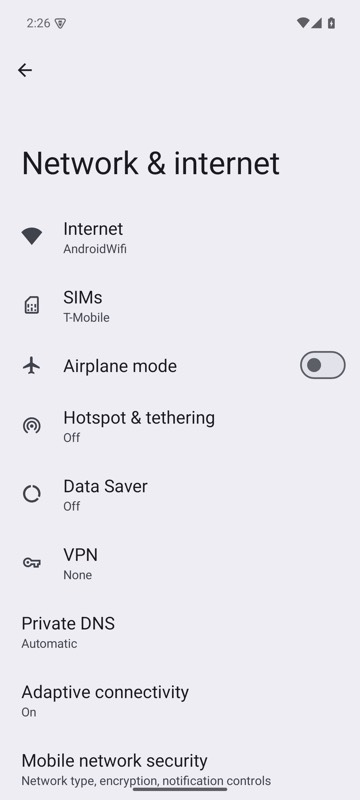 | 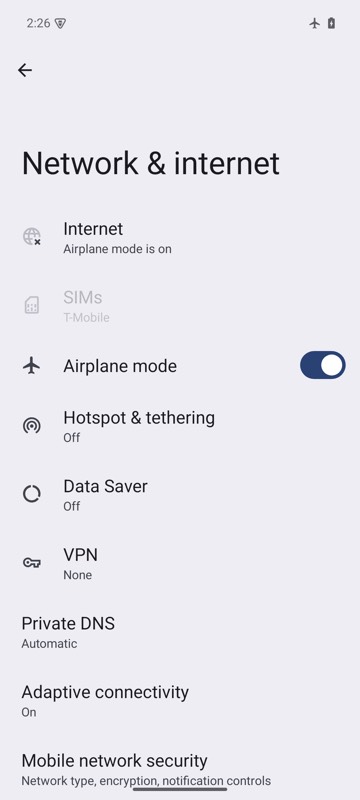 |
mobium network --offline on an Android 15 emulator
A slow connection, on an emulator
{
  "latency_ms": 300,
  "download_kbps": 500
}
On an Android 15 emulator the answer's text was:
online; 300ms added to each round trip, download 500 kbit/s