app_orientation
This tool on every surface: CLI · MCP · Python · JavaScript · Go · Java · .NET
Read which way the screen is turned, or turn it. Call with no argument to read — the answer says both the orientation and whether it is pinned, because a screen that happens to be portrait can rotate under you. A rotation re-lays out every screen, so a layout that only exists in landscape is one nothing has tested. Setting an orientation pins it; "auto" hands it back to the sensor. Changing it invalidates the refs from the previous screen, because bounds do not survive a rotation. An activity that locks its own orientation cannot be turned from outside, and that is reported rather than silently ignored.
Changes the device, the app or the session: readOnlyHint is false.
Arguments
| Name | Type | Required | What it is |
|---|---|---|---|
device | string | Device serial to target, e.g. "emulator-5554". Omit when only one device is running. | |
driver | string: uiautomator2, uiautomator, wda | Driver to use: "uiautomator2" (default for Android; fast, installs a server APK on first use), "uiautomator" (Android, installs nothing, slower, cannot type), or "wda" (WebDriverAgent: iOS simulators and iPhones). | |
orientation | string: portrait, landscape, portrait-reverse, landscape-reverse, auto | "portrait", "landscape", "portrait-reverse", "landscape-reverse", or "auto" to follow the sensor. Omit to read. Not "left"/"right": the two platforms disagree about which landscape is which. |
Examples
Each is the arguments of a tools/call request; the first is shown whole.
Turn the screen to landscape
{
  "jsonrpc": "2.0",
  "id": 1,
  "method": "tools/call",
  "params": {
    "name": "app_orientation",
    "arguments": {
      "orientation": "landscape"
    }
  }
}
On an Android 15 emulator the answer's text was:
landscape (locked) (was portrait)
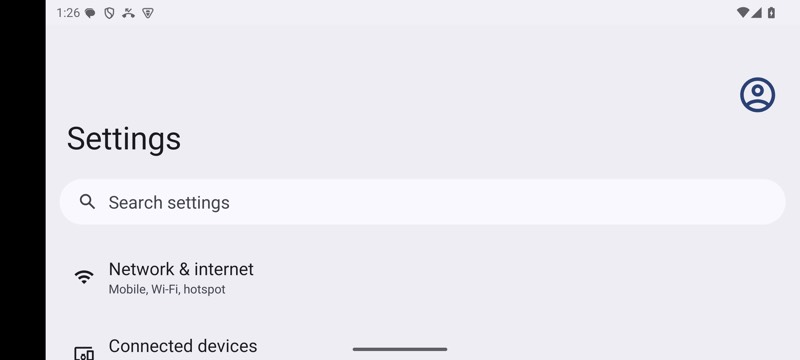
mobium orientation landscape on an Android 15 emulator