app_press
This tool on every surface: CLI · MCP · Python · JavaScript · Go · Java · .NET
Press a hardware button. On Android: "back", "home", "recents", "volume-up", "volume-down"; a remote's D-pad, "dpad-up", "dpad-down", "dpad-left", "dpad-right" and "select"; and its media keys, "play-pause", "stop", "next", "previous", "rewind", "fast-forward". The D-pad is how a TV is driven: a D-pad press says where focus went, or that it did not move, and select activates what has focus. iOS has none of them. back is primary navigation on Android — an app that opened a detail screen expects it, and no amount of tapping substitutes. iOS has no back button by design, and mobium refuses back there rather than sending an edge swipe in its place. gesture: true asks for back as the finger gives it — a swipe in from the left edge — on both platforms: on iOS it starts in the navigation bar, since a list row with swipe actions takes the swipe for itself; on Android it is refused where the device navigates with buttons, because an edge swipe is not back there. Back says what it did: whether it left the app and what is in front now, and on iOS what the navigation bar says — the difference between going back a screen and closing the app. Home reports the launcher coming forward. Any press can move the screen, so the refs from the last app_map are discarded; map again before acting.
Changes the device, the app or the session: readOnlyHint is false.
Arguments
| Name | Type | Required | What it is |
|---|---|---|---|
button | string: back, home, recents, volume-up, volume-down, dpad-up, dpad-down, dpad-left, dpad-right, select, play-pause, stop, next, previous, rewind, fast-forward | yes | Which button. Refused with the list of what this platform has. |
device | string | Device serial to target, e.g. "emulator-5554". Omit when only one device is running. | |
driver | string: uiautomator2, uiautomator, wda | Driver to use: "uiautomator2" (default for Android; fast, installs a server APK on first use), "uiautomator" (Android, installs nothing, slower, cannot type), or "wda" (WebDriverAgent: iOS simulators and iPhones). | |
gesture | boolean | Back only: a swipe in from the left edge instead of the key. The way to test what predictive back or an iOS navigation stack does; refused on an Android device using button navigation. |
Examples
Each is the arguments of a tools/call request; the first is shown whole.
Press Back
{
  "jsonrpc": "2.0",
  "id": 1,
  "method": "tools/call",
  "params": {
    "name": "app_press",
    "arguments": {
      "button": "back"
    }
  }
}
On an Android 15 emulator the answer's text was:
pressed back
| Before | After |
|---|---|
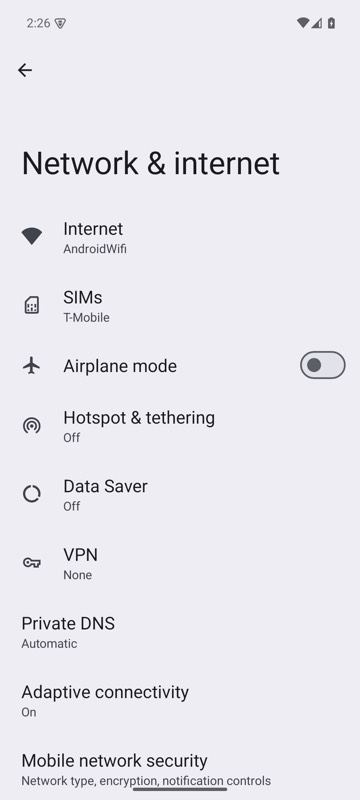 | 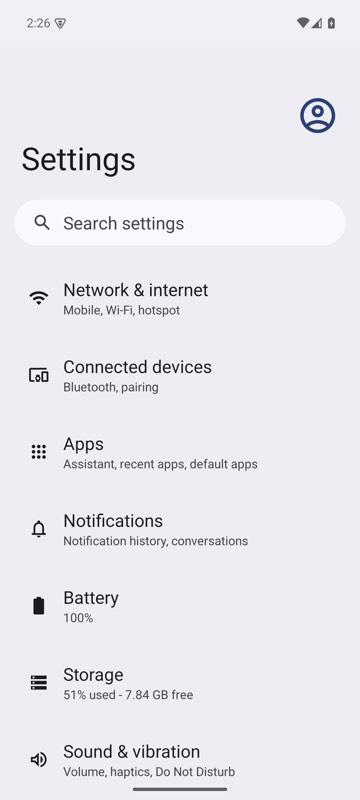 |
mobium press back on an Android 15 emulator
Go to the home screen
{
  "button": "home"
}
On an Android 15 emulator the answer's text was:
pressed home — com.google.android.apps.nexuslauncher is in the foreground
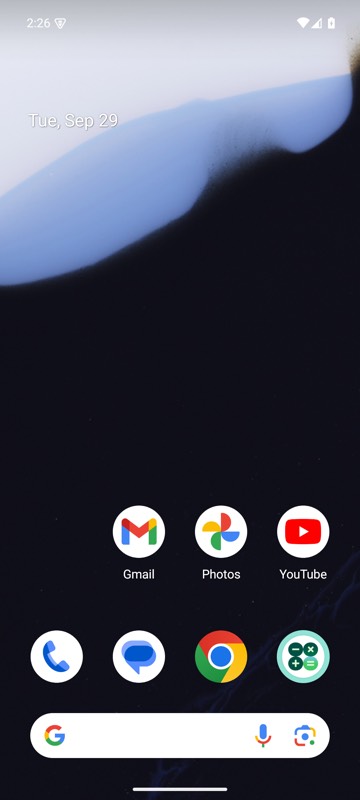
mobium press home on an Android 15 emulator
Move focus with a TV remote's D-pad
{
  "button": "dpad-down"
}
On an Android 15 emulator the answer's text was:
pressed dpad-down — focus moved to homepage_container
Go back with a swipe in from the edge
{
  "button": "back",
  "gesture": true
}
On an Android 15 emulator the answer's text was:
swiped back from the left edge, halfway down — com.android.settings is still in the foreground; app_map shows which screen