app_press_drag
This tool on every surface: CLI · MCP · Python · JavaScript · Go · Java · .NET
Press and drag: one finger holds an element while a second finger drags from one place to another, and the first lifts only after the second has. Not app_drag, which is one finger carrying something; here the held finger anchors and the other moves. Give hold, from and to as refs or locators, or x1,y1 (hold), x2,y2 (from) and x3,y3 (to). It reports that the gesture was delivered: call app_map again to see what it did. Android 15 and earlier only, for app_press_tap's reasons. Discards the refs from the last app_map.
Changes the device, the app or the session: readOnlyHint is false.
Arguments
| Name | Type | Required | What it is |
|---|---|---|---|
device | string | Device serial to target, e.g. "emulator-5554". Omit when only one device is running. | |
driver | string: uiautomator2, uiautomator, wda | Driver to use: "uiautomator2" (default for Android; fast, installs a server APK on first use), "uiautomator" (Android, installs nothing, slower, cannot type), or "wda" (WebDriverAgent: iOS simulators and iPhones). | |
duration_ms | integer | How long the second finger's travel takes, in milliseconds. Defaults to 600. | |
from | string | A ref or locator where the second finger lands. | |
hold | string | A ref or locator for what the first finger holds. | |
lead_ms | integer | How long the first finger rests before the second lands, in milliseconds. Defaults to 300, under Android's long-press timeout. | |
to | string | A ref or locator where the second finger lifts. | |
x1 | integer | Held point, X in device pixels. Instead of hold. | |
x2 | integer | Second finger's start, X. Instead of from. | |
x3 | integer | Second finger's end, X. Instead of to. | |
y1 | integer | Held point, Y in device pixels. | |
y2 | integer | Second finger's start, Y. | |
y3 | integer | Second finger's end, Y. |
Examples
Each is the arguments of a tools/call request; the first is shown whole.
Hold one thing and drag another
{
  "jsonrpc": "2.0",
  "id": 1,
  "method": "tools/call",
  "params": {
    "name": "app_press_drag",
    "arguments": {
      "hold": "@e3",
      "from": "@e5",
      "to": "@e9"
    }
  }
}
On a device
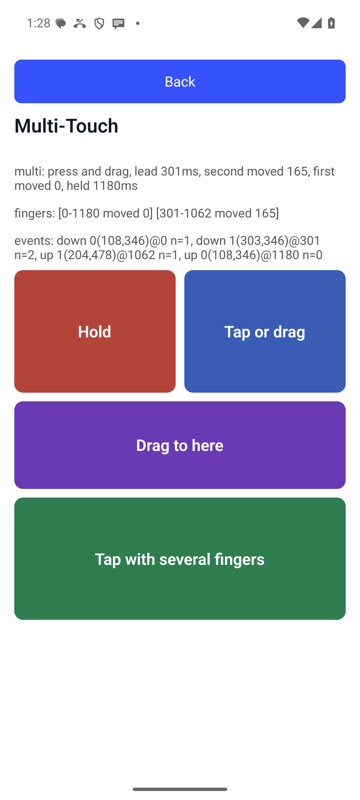
mobium press-drag 'label=Hold zone' 'label=Act zone' 'label=Drag end' on an Android 15 emulator