app_speech
This tool on every surface: CLI · MCP · Python · JavaScript · Go · Java · .NET
What the screen reader says — VoiceOver on a real iPhone (iOS 27, a runner built by Xcode 27), TalkBack on Android. With nothing else, the sentence for the element its cursor is on; with target, the cursor is put on that element first; with walk, it moves forward in the screen reader's own order, a swipe right at a time, until it goes no further, comes back round, or limit moves are made. Each sentence is beside the element it was said about, with its locator and whether map lists it — a heading or a status line is spoken and not listed. It answers what map cannot: the order a screen reader user meets things in, what a control's state and hint sound like, and whether a status is spoken at all. The screen reader must be on (app_accessibility screen_reader on). TalkBack is moved with a USB keyboard Android makes for the call and read from its log, which holds what it says only with TalkBack's Developer settings, Log output level, at VERBOSE. A sentence about a password field is not shown. A simulator's runner cannot reach VoiceOver and is refused. With listen, it hears what an action makes the screen reader say: start, act, stop.
Changes the device, the app or the session: readOnlyHint is false.
Arguments
| Name | Type | Required | What it is |
|---|---|---|---|
device | string | Device serial to target, e.g. "emulator-5554". Omit when only one device is running. | |
driver | string: uiautomator2, uiautomator, wda | Driver to use: "uiautomator2" (default for Android; fast, installs a server APK on first use), "uiautomator" (Android, installs nothing, slower, cannot type), or "wda" (WebDriverAgent: iOS simulators and iPhones). | |
limit | integer | How many moves a walk makes at most, or putting the cursor on target takes on Android. Default 40, at most 200. | |
listen | string: start, stop | Listen to what the screen reader says while you act: "start" before the action, "stop" after, which waits for quiet and answers with every sentence said since, each with its cause — the cursor moving, an announcement, or a change on screen such as a live region's. On an iPhone, what VoiceOver said, asked every quarter second, with no cause. | |
target | string | An element to put the screen reader's cursor on first ("@e5" or a locator). On iOS a touch, as a VoiceOver user's; on Android the cursor is moved forward until it is there. | |
walk | boolean | Move forward through the screen, reporting each sentence. |
Examples
Each is the arguments of a tools/call request; the first is shown whole.
Say what the screen reader says about the element its cursor is on
{
  "jsonrpc": "2.0",
  "id": 1,
  "method": "tools/call",
  "params": {
    "name": "app_speech",
    "arguments": {}
  }
}
On an Android 15 emulator the answer's text was:
TalkBack says: "not checked. Pro. Radio button" — Pro (radio)
Walk the screen in the screen reader's order, each sentence beside its element
{
  "walk": true,
  "limit": 20
}
On an Android 15 emulator the answer's text was:
TalkBack says:
  1. "not checked. Team. Radio button" — Team (radio)
  2. "OFF. Dark mode. Switch" — Dark mode (switch)
  3. "Dark mode, for the whole app" — Dark mode, for the whole app, not in map
  4. "Read-only" — Read-only, not in map
  5. "This field cannot be edited. Edit box. disabled"
  6. "notify=false terms=false plan=free theme=light" — notify=false terms=false plan=free theme=light, not in map
  7. (nothing)
  8. "Back. Button" — Back (button)
  9. "Form" — Form, not in map
 10. "not checked. Email me. Check box" — Email me (checkbox)
 11. "not checked. Accept terms. Check box" — Accept terms (checkbox)
 12. "checked. Free. Radio button" — Free (radio)
 13. "not checked. Pro. Radio button" — Pro (radio)
ended: the cursor came back round to the first element
Put the screen reader's cursor on an element, and hear what it says
{
  "target": "label=Pro"
}
On an Android 15 emulator the answer's text was:
TalkBack says: "not checked. Pro. Radio button" — Pro (radio)
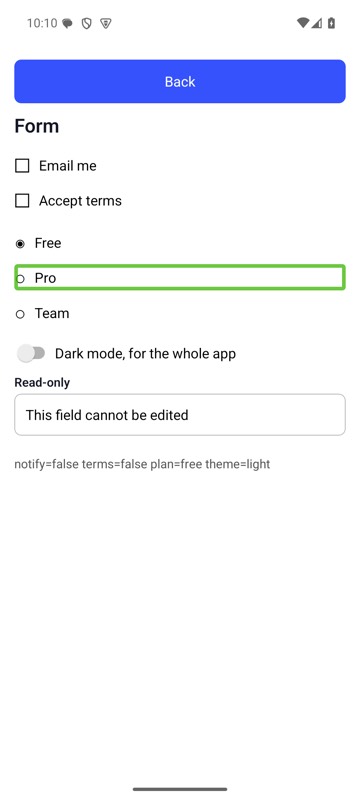
mobium speech label=Pro on an Android 15 emulator
Start listening to the screen reader, before an action
{
  "listen": "start"
}
On an Android 15 emulator the answer's text was:
listening to TalkBack — act, then stop it with listen stop
Stop listening, and hear what the action made it say
{
  "listen": "stop"
}
On an Android 15 emulator the answer's text was:
TalkBack said, since listening started: "Live cart: 1" — Live cart: 1, not in map [a change on screen]