app_timezone
This tool on every surface: CLI · MCP · Python · JavaScript · Go · Java · .NET
Read the device timezone, or change it. Unlike app_call this works on real hardware. A clock that jumps a zone mid-session breaks scheduling, caching and anything that stored a local timestamp, which is why time-based interruptions are worth testing. Takes an IANA name such as "Asia/Tokyo". Confirmed by reading it back — an unknown zone name is accepted and ignored, so the check is the only thing that makes the answer worth anything. iOS has no device time zone that can be set from outside, so there it is the session's: every app Mobium launches gets it as TZ, the app in front is launched again in it, and setting the device's own zone ends it; an unknown zone is refused.
Changes the device, the app or the session: readOnlyHint is false.
Arguments
| Name | Type | Required | What it is |
|---|---|---|---|
device | string | Device serial to target, e.g. "emulator-5554". Omit when only one device is running. | |
driver | string: uiautomator2, uiautomator, wda | Driver to use: "uiautomator2" (default for Android; fast, installs a server APK on first use), "uiautomator" (Android, installs nothing, slower, cannot type), or "wda" (WebDriverAgent: iOS simulators and iPhones). | |
timezone | string | An IANA zone, e.g. "Asia/Tokyo". Omit to read. |
Examples
Each is the arguments of a tools/call request; the first is shown whole.
Move the device to Tokyo time
{
  "jsonrpc": "2.0",
  "id": 1,
  "method": "tools/call",
  "params": {
    "name": "app_timezone",
    "arguments": {
      "timezone": "Asia/Tokyo"
    }
  }
}
On an Android 15 emulator the answer's text was:
Asia/Tokyo (was America/Los_Angeles)
| Before | After |
|---|---|
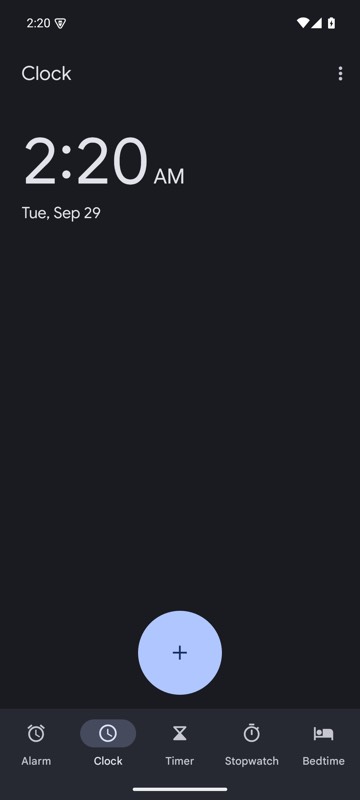 | 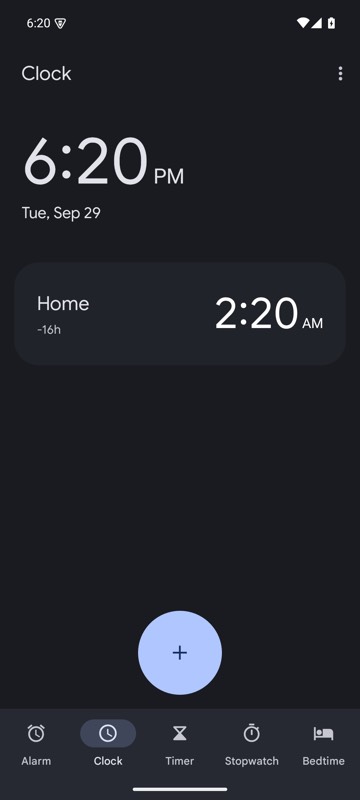 |
mobium timezone Asia/Tokyo on an Android 15 emulator