app_type
This tool on every surface: CLI · MCP · Python · JavaScript · Go · Java · .NET
Type text into a specific element, after what it already holds; app_fill replaces it instead. The element is located on the device, so the text goes where you aimed it rather than wherever focus happens to be, and quotes, spaces and non-ASCII survive intact. Pass an empty string to clear the field. Not on Android's uiautomator dump driver, which declines text entry rather than enter it wrong.
Changes the device, the app or the session: readOnlyHint is false.
Arguments
| Name | Type | Required | What it is |
|---|---|---|---|
device | string | Device serial to target, e.g. "emulator-5554". Omit when only one device is running. | |
driver | string: uiautomator2, uiautomator, wda | Driver to use: "uiautomator2" (default for Android; fast, installs a server APK on first use), "uiautomator" (Android, installs nothing, slower, cannot type), or "wda" (WebDriverAgent: iOS simulators and iPhones). | |
target | string | yes | A ref from app_map ("@e3") or a locator ("testid=search"). |
text | string | yes | The text to enter. An empty string clears the field. |
Examples
Each is the arguments of a tools/call request; the first is shown whole.
Type after what a field holds
{
  "jsonrpc": "2.0",
  "id": 1,
  "method": "tools/call",
  "params": {
    "name": "app_type",
    "arguments": {
      "target": "testid=email",
      "text": "hello@example.com"
    }
  }
}
On a device
| Before | After |
|---|---|
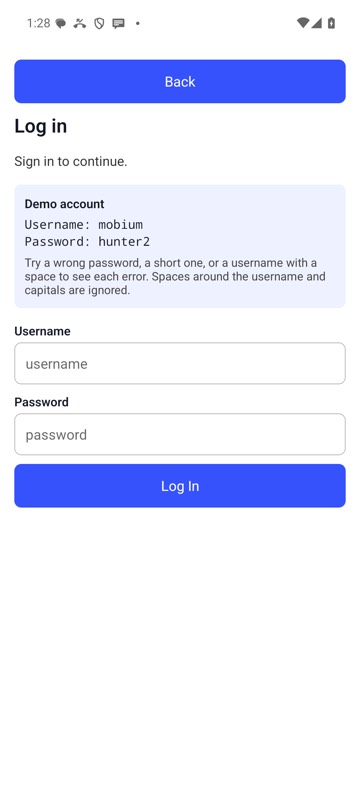 | 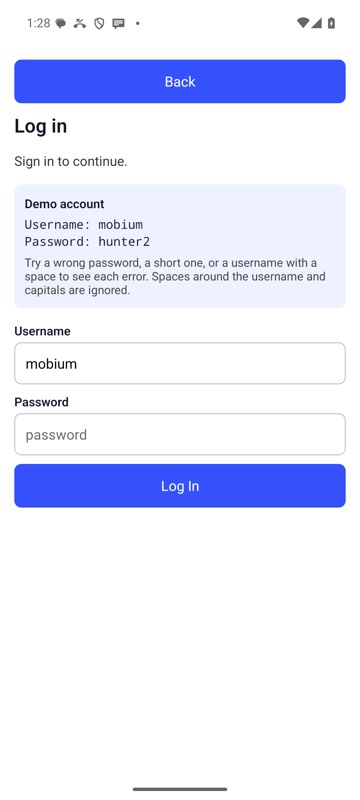 |
mobium type testid=username mobium on an Android 15 emulator