app_upload
This tool on every surface: CLI · MCP · Python · JavaScript · Go · Java · .NET
Put a file from this machine where the device keeps downloads, so an app's file picker finds it: Android's shared Download folder, or on iOS an app's own Documents folder, which the Files app shows under On My iPhone. Android's picker reads MediaStore rather than the folder, so the file is indexed and read back there, and on a real iPhone its bytes are read back and compared; the answer says how it was confirmed. Upload a file for a test that picks one; download what an app saved. With device_path, a file or a whole folder goes to a path you name instead: on Android an absolute shell path (/sdcard/..., /data/local/tmp/...), or with app a path in that app's private data — a debuggable build only, as Android allows; on iOS a path in the app's data container (Documents/..., Library/..., tmp/...). Every file's size is read back at the far end.
Changes the device, the app or the session: readOnlyHint is false.
Arguments
| Name | Type | Required | What it is |
|---|---|---|---|
app | string | iOS: the bundle id whose Documents — or, with device_path, whose data container — it goes to. Defaults to the app in front. Android: with device_path, the package whose private data the path is in; otherwise ignored, Android having one Download folder for every app. | |
content | string | The file itself, base64, instead of a path — for a daemon on another machine; give name with it. The CLI and pipe send it from a path. | |
device | string | Device serial to target, e.g. "emulator-5554". Omit when only one device is running. | |
device_path | string | Where on the device the file or folder goes, in full. Android: absolute, or with app relative to that app's data folder. iOS: relative to the app's data container. | |
driver | string: uiautomator2, uiautomator, wda | Driver to use: "uiautomator2" (default for Android; fast, installs a server APK on first use), "uiautomator" (Android, installs nothing, slower, cannot type), or "wda" (WebDriverAgent: iOS simulators and iPhones). | |
name | string | The name to give it on the device — a name, not a path. Defaults to the file's own. | |
path | string | The file on this machine to upload — or, with device_path, a folder. |
Examples
Each is the arguments of a tools/call request; the first is shown whole.
Send a file where the device keeps downloads
{
  "jsonrpc": "2.0",
  "id": 1,
  "method": "tools/call",
  "params": {
    "name": "app_upload",
    "arguments": {
      "path": "invoice-42.txt"
    }
  }
}
On an Android 15 emulator the answer's text was:
uploaded …/invoice-42.txt to Download/invoice-42.txt (24 bytes) — confirmed by its size read back on the device, and MediaStore listing it
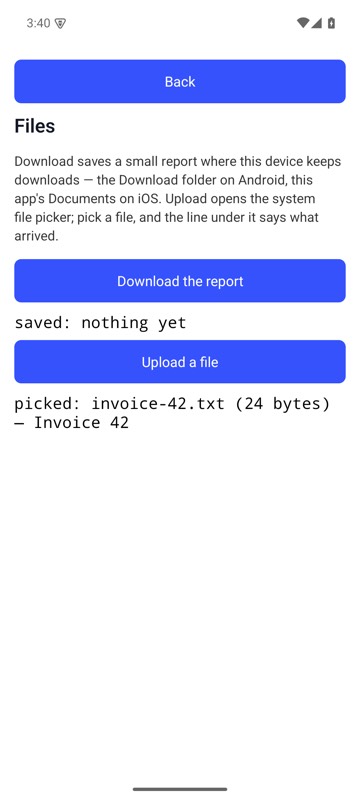
After mobium upload invoice-42.txt, the Files Demo's Upload a file opened the system picker, the file was in it, and the line under the button says the name, size and first line of what arrived — on an Android 15 emulator
Send a folder to a path on the device
{
  "path": "./seed",
  "device_path": "/sdcard/seed"
}
On an Android 15 emulator the answer's text was:
uploaded …/seed to /sdcard/seed (a folder of 2 files, 8 bytes) — confirmed by each of its 2 files' sizes read back on the device