app_wait_for
This tool on every surface: CLI · MCP · Python · JavaScript · Go · Java · .NET
Wait until an element appears, disappears, shows particular text, or reaches a state — enabled, checked, focused, holding a value — then return. Use this instead of sleeping after an action that takes time — a login, a network fetch, a screen transition. On success the screen is remapped, so the element it waited for already has a ref and can be tapped straight away. If the condition never holds the call fails, saying what the screen showed instead.
Read-only: readOnlyHint is true.
Arguments
| Name | Type | Required | What it is |
|---|---|---|---|
condition | string: visible, hidden, text, value, enabled, disabled, checked, unchecked, focused, count | "visible" (default) waits for it to be on screen, "hidden" waits for it to go away — a spinner, say — "text" waits until it contains the text given below, "value" until a field holds exactly that text ("" for empty; a password field is refused, since its value is never read), "enabled" or "disabled" waits for a control to be one or the other — a Submit the app enables once a form is valid — "checked" or "unchecked" for a checkbox, radio or switch, and "focused" for a field to have keyboard focus, and "count" until the locator matches count elements on screen. not inverts any of them. | |
count | integer | With condition "count", how many elements the locator must match on screen. | |
device | string | Device serial to target, e.g. "emulator-5554". Omit when only one device is running. | |
driver | string: uiautomator2, uiautomator, wda | Driver to use: "uiautomator2" (default for Android; fast, installs a server APK on first use), "uiautomator" (Android, installs nothing, slower, cannot type), or "wda" (WebDriverAgent: iOS simulators and iPhones). | |
exact | boolean | With condition "text", match the whole text rather than a part. | |
not | boolean | Wait for the opposite of the condition: with "text", for the text to change; with "checked", for it to come unchecked. | |
target | string | yes | A ref from app_map ("@e5") or a locator ("text=Welcome"). |
text | string | The text to wait for: required by condition "text", and by "value", where "" waits for an empty field. Unused otherwise. | |
timeout_ms | integer | How long to wait before failing, in milliseconds. Default 10000, maximum 120000. |
Examples
Each is the arguments of a tools/call request; the first is shown whole.
Wait for text to appear
{
  "jsonrpc": "2.0",
  "id": 1,
  "method": "tools/call",
  "params": {
    "name": "app_wait_for",
    "arguments": {
      "target": "text=Welcome back"
    }
  }
}
Wait for a spinner to go
{
  "target": "role=progressbar",
  "condition": "hidden"
}
Wait for a checkbox to be checked, for up to five seconds
{
  "target": "testid=termsCheck",
  "condition": "checked",
  "timeout_ms": 5000
}
On an Android 15 emulator the answer's text was:
testid=termsCheck is checked after 18ms — @e3 Accept terms (checkbox, checked)
On a device
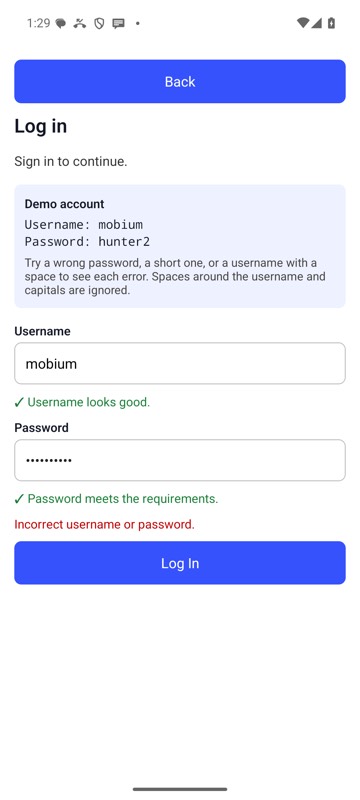
mobium wait testid=loginError --for text --text 'Incorrect username or password.' on an Android 15 emulator