download · pull_path · downloads
This tool on every surface: CLI · MCP · Python · JavaScript · Go · Java · .NET
Bring back a file from where the device keeps downloads — Android's shared Download folder, or on iOS an app's own Documents — to check what an app saved. These call app_download.
download
def download(name: str, path: str | None=None, app: str | None=None) -> bytes | dict
Bring back a file from where the device keeps downloads, to check what an app saved.
The folder is Android's shared Download folder, or on an iOS simulator an app's own Documents — the app named, or the one in front — and on a real iPhone the same. The copy's size is read back against the device's.
With path, saves it there and returns the transfer (name,
where, bytes, checked, path); without one, returns the
file's bytes.
pull_path
def pull_path(device_path: str, path: str | None=None, app: str | None=None) -> bytes | dict
Bring back the file or folder at a path on the device — the paths push_path takes.
With path, saves it there (a folder needs a path that does not exist
yet) and returns the transfer, with files and folder; without
one, returns a file's bytes.
downloads
def downloads(app: str | None=None) -> list[dict]
What the downloads folder holds, each file with name, bytes and modified.
Android's shared Download folder, whatever app put it there; on an iOS simulator an app's own Documents — the app named, or the one in front — and on a real iPhone the same.
Examples
Bring back a file an app saved
saved = device.download("mobium-report.txt", path="report.txt")
print(saved["path"], saved["bytes"])

# Or the file itself, as bytes
report = device.download("mobium-report.txt")
The same call from the command line, mobium download mobium-report.txt -o report.txt, printed on an Android 15 emulator:
downloaded mobium-report.txt from Download/mobium-report.txt to …/report.txt (44 bytes) — confirmed by the copy's size read back against the device's
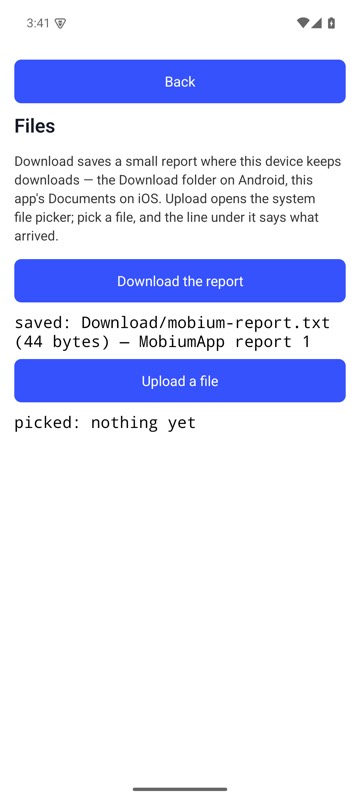
The Files Demo's Download the report saved mobium-report.txt in the Download folder, and the line under it says how big and which save it was; mobium download brought that file back — on an Android 15 emulator
List what the folder holds
for f in device.downloads():
    print(f["name"], f["bytes"])
The same call from the command line, mobium download, printed on an Android 15 emulator:
the Download folder holds 1 file
  mobium-report.txt                                44 bytes  2026-09-29 03:41
Bring back a folder from a path on the device
got = device.pull_path("/sdcard/seed", path="seed-copy")
print(got["files"], got["path"])
The same call from the command line, mobium download --device-path /sdcard/seed -o seed-copy, printed on an Android 15 emulator:
downloaded seed from /sdcard/seed to …/seed-copy (a folder of 2 files, 8 bytes) — confirmed by each of its 2 files' sizes read back against the device's