network · set_offline · shape_network · set_proxy · reset_network
This tool on every surface: CLI · MCP · Python · JavaScript · Go · Java · .NET
Read or set the device's network conditions: offline, latency, bandwidth and an HTTP proxy. These call app_network.
network
def network() -> dict
The network: airplane, online, and the shaping —
latency_ms, download_kbps, upload_kbps, zero for none —
and proxy, absent for none. Android only.
set_offline
def set_offline(offline: bool=True) -> dict
Turn airplane mode on (or off) and wait for the network to go (or come back) — on an emulator or a real Android phone.
shape_network
def shape_network(latency_ms: int=0, download_kbps: int=0, upload_kbps: int=0) -> dict
Add latency to each round trip and limit download and upload, in kbit/s, replacing any shaping set before; zero is none. Needs root, so an emulator.
set_proxy
def set_proxy(hostport: str) -> dict
Point the device's HTTP proxy at host:port — 127.0.0.1 is
this machine's, through adb reverse — or take it off with "".
Any Android device.
reset_network
def reset_network() -> dict
Remove the shaping and the proxy and turn airplane mode off.
Examples
Go offline
device.set_offline()
The same call from the command line, mobium network --offline, printed on an Android 15 emulator:
offline (airplane mode)
| Before | After |
|---|---|
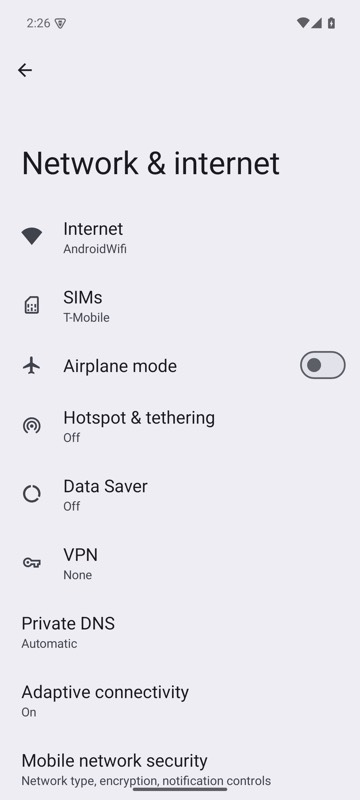 | 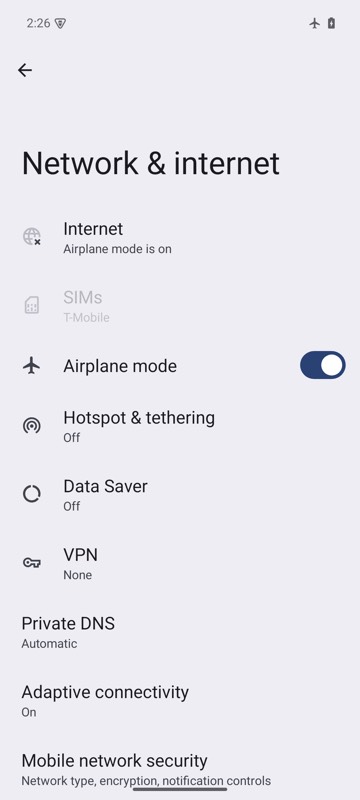 |
mobium network --offline on an Android 15 emulator
A slow connection, on an emulator
device.shape_network(latency_ms=300, download_kbps=500)
The same call from the command line, mobium network --latency 300 --download 500, printed on an Android 15 emulator:
online; 300ms added to each round trip, download 500 kbit/s